Tutorial
BeginnerBuild a Renewal Reminder Schedule From Fixed Rules, With No AI Choosing Who Gets What
Turn a member list and rules you write into a dated renewal reminder schedule in a browser lab, with a reason recorded for every member left off, then have a person check the dates before anything is sent.
Time needed: About 40 minutes
Before you start:
- A member export as a CSV file with expiry dates, or use the sample list
- A recent desktop browser and a spreadsheet program to open the results
- The email or mail-merge tool you already use, which this tutorial does not test
Renewals Reminders Membership Operations Scheduling
By the end of this tutorial you will have a dated list of which renewal notice goes to which member on which day, built from rules you wrote, with every member who was left off listed beside the reason.
Try it now: the renewal reminder schedule turns a member list and your notice rules into dates. Nothing you open leaves the tab, and the page sends no reminders.
What two outside examples can and cannot tell you
An article by Tim Ebner in Associations Now, the July/August 2018 issue, reports that the Association of College Unions International gives members a 10-week grace period before dropping them, with more urgent and deadline-specific warnings in it, and advises a dropped-member notice as the last communication. It also reports 94.6 percent retention over the past year. That is one association’s own figure, credited to its outreach with no comparison group, so it shows the practice exists and not that it works.
A U.S. General Services Administration evaluation of Medicaid renewals in Norfolk, Virginia, ran from June to November 2024 among 7,468 cases and added two text messages and a phone call to three standard reminders. Of the cases, 6,872 (91 percent) renewed (page read October 2026). That is a health coverage program, not an association. In the Norfolk project, the extra texts and call on top of three standard reminders “did not significantly affect the number of renewals”, and the page says similar programs could leave them out without lowering renewal rates.
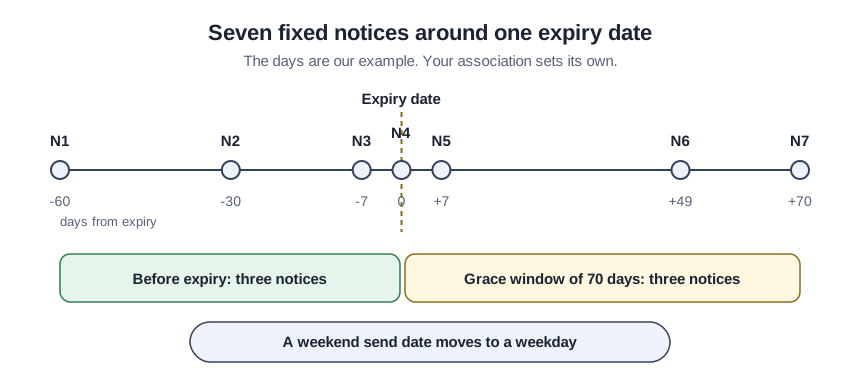
Fixed rules suit this job because anyone can read a rule back, and the same list planned on the same as-of date gives the same dates every time. Neither source tested a schedule like this one. The notice days and the 70-day grace window are ours, picked so the last notice lands at the 10 weeks the article describes. Your association chooses its own.
Build the schedule in fourteen steps
- Export the member list as a CSV file. One row per member is enough.
- Check the header row for six column names. They are member_id, email, expiry_date, status, renewed_on and opted_out.
- Write every date as year-month-day. A date such as 2026-12-31 is read, and 12/31/26 is reported as an error.
- Write the notices one per line. Each line holds an id, the days from expiry and a template name, and days before expiry are negative.
- Choose the grace window in days. No notice may be later than this many days after expiry.
- Choose the shortest gap between two notices. A notice that would land closer to the one before it is dropped.
- List the statuses that never get a reminder. The lab starts with resigned, deceased and suspended.
- Decide whether weekend send dates move to a weekday. The lab moves them earlier before expiry and later on or after it.
- Open your CSV file in the lab. Load the sample list first if you want to see the layout.
- Set the as-of date. Use the day you exported the list.
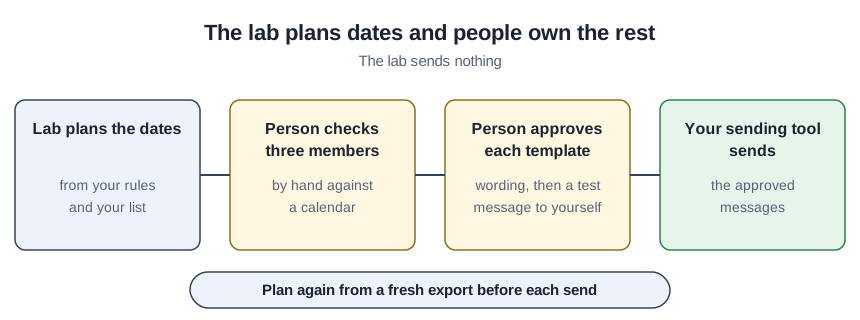
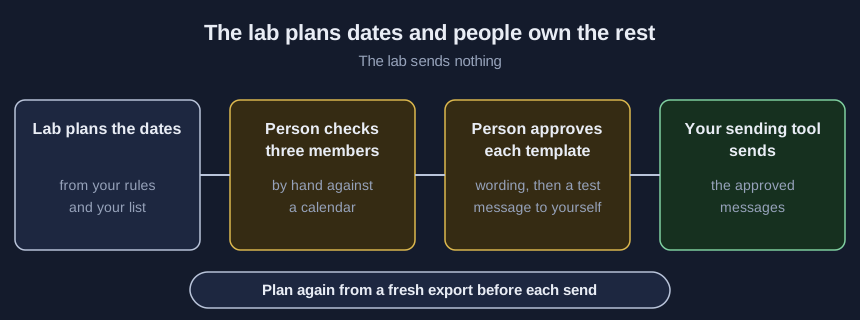
- Press Plan. The counts, the planned notices and the held-back list appear below the buttons.
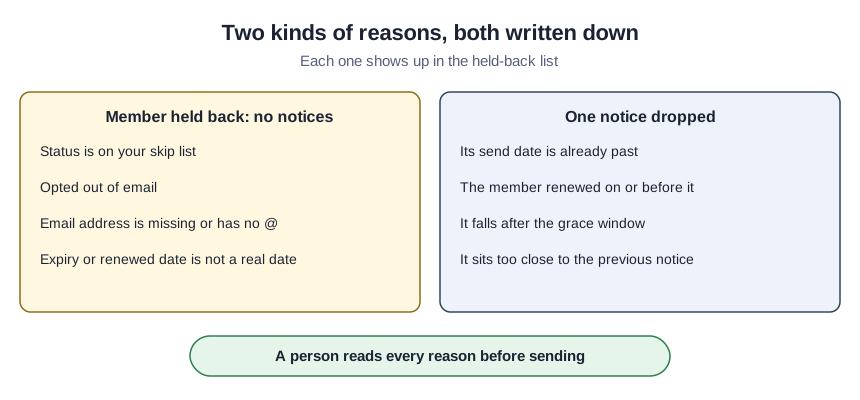
- Read the held-back list line by line. A reason you cannot explain points to a data problem or a rule problem.
- Compare three members with a calendar. Pick one with a weekend date, one who renewed and one already inside the grace window.
- Download schedule.csv. The email column stays off unless you tick it, and the file opens in your spreadsheet program.
A teaching example: seven invented members
Everything here is invented and comes from the sample in the kit, planned as of 2026-10-04, so it shows what the rules do and not how your list will behave.
The sample plans 18 notices for three of the seven members. The member expiring 2026-12-31 gets seven. The first falls on Friday 2026-10-30 because the date 60 days earlier is a Sunday and moves earlier, and the last is 2027-03-11. The member expiring on the leap day 2028-02-29 gets seven with no date error.
A member whose expiry was Saturday 2026-10-03 is already inside the grace window. Three earlier notices are dropped as past, the expiry notice moves to Monday 2026-10-05 and three more follow. One renewal is dated 2026-10-20, after the as-of date, so the lab reports a data-entry check and plans nothing. The last three members opted out, have no email or resigned. Type 2026-10-05 in the Date box under “Due on one date”, just below the counts, and exactly one notice shows.
Confirm the dates before anything is sent
Five things should be true. The counts add up, so members with a notice plus members with none equals members read. Each line in the held-back list has a reason you can explain. Planning the same file twice gives two identical schedules. A person approved every template. A test message reached an address you control. If AI helped draft the wording, the human-voice routine for member emails keeps a person answerable for it.
Where a schedule sends the wrong reminder
- An old export. A member who renewed yesterday still gets a notice.
- A renewed_on date nobody owns. Stale or mistyped dates pass straight through, so ask who enters them.
- Our grace window treated as a standard. No source tested it.
- Notices added because more contact should mean more renewals. The Medicaid evaluation did not find that for its extras.
- Holidays, send hours and time zones. The lab knows none of them, so a notice can land on a day nobody sends.
- The email column left ticked. Member ids are enough for the person checking the schedule.
Whether reminders to opted-out members are allowed is a question for counsel, and the newsletter template tutorial covers sending setup.
What you get in the download
A short form on the demo page hands over the free kit. It holds the lab page for your own computer, a script that plans the same dates, the seven-member sample, a member-list template, a rule worksheet and a review checklist.
Sources (2)
- Tim Ebner, Associations Now: 3 Tips for Perfectly Timed Renewal Reminders (association magazine article, July/August 2018 issue)
- U.S. General Services Administration, Office of Evaluation Sciences: Increasing Medicaid Renewals With Text Message Reminders (government project summary page, undated, page read October 2026)