Tutorial
Build the AssociationAI Newsletter Template
Build a working HTML newsletter template for your association: a table-based layout that survives Gmail and Outlook, named placeholders for every variable, and a script that turns one JSON file into a finished issue.
Time needed: About two hours the first time; under an hour once the files exist
Before you start:
- A text editor and Python 3 on your computer
- Your logo as a PNG file, hosted at an https URL
- Your organization's street address for the footer
Newsletter Email Templates
By the end of this tutorial you will have a working HTML newsletter template: a table-based layout that survives Gmail and Outlook, named placeholders for every variable, and a script that turns one JSON file into a finished issue. This is the template behind the AssociationAI weekly newsletter, and the files below are the real ones.
See what you’re building
This is a real issue rendered from the template: the same files you’ll build below, filled in by one JSON file. Scroll through it and click the links, then build your own.
Open the full preview in a new tab
Stage 1: save the template file
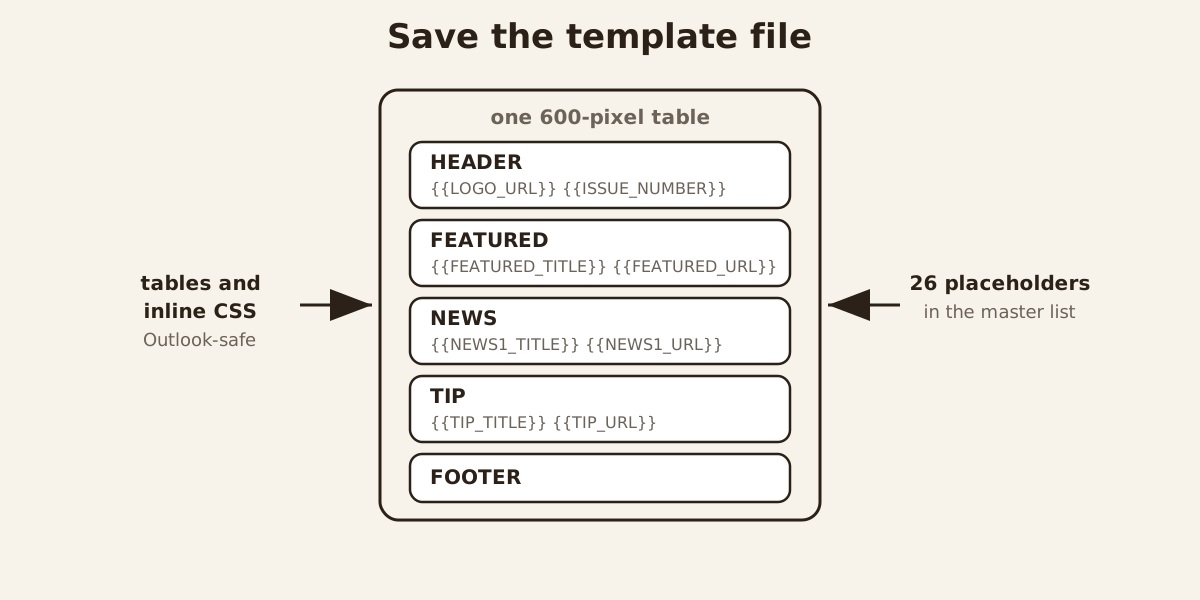
- Save the skeleton with five blocks inside one 600-pixel table. Email clients still need tables and inline CSS, because a modern div layout breaks in Outlook.
<!DOCTYPE html PUBLIC "-//W3C//DTD XHTML 1.0 Transitional//EN"
  "http://www.w3.org/TR/xhtml1-transitional.dtd">
<html xmlns="http://www.w3.org/1999/xhtml">
<head>
  <meta http-equiv="Content-Type" content="text/html; charset=UTF-8" />
  <meta name="viewport" content="width=device-width, initial-scale=1.0" />
  <title>Your Newsletter: Issue #{{ISSUE_NUMBER}}</title>
  <style type="text/css">
    #outlook a { padding: 0; }
    @media only screen and (max-width: 620px) {
      .email-container { width: 100% !important; }
    }
  </style>
</head>
<body style="margin:0; padding:0; background-color:#f6f7f9;">
  <div style="display:none; max-height:0; overflow:hidden; opacity:0;">{{PREHEADER}}</div>
  <center style="width:100%;">
    <div class="email-container" style="max-width:600px; margin:0 auto;">
      <table role="presentation" cellspacing="0" cellpadding="0" border="0" width="100%">
        <!-- HEADER --><!-- FEATURED --><!-- NEWS --><!-- TIP --><!-- FOOTER -->
      </table>
    </div>
  </center>
</body>
</html>- Mark every variable as a
{{PLACEHOLDER}}and keep the master list. Never type an issue’s content into the template. Every value that changes week to week becomes a token in double braces; our template has 26.
| Token | Example | Note |
|---|---|---|
PREHEADER | “This week: a routine for checking AI drafts” | Hidden preview text, 40 to 100 characters |
LOGO_URL | https://www.example.org/images/logo.png | Absolute https URL, never a relative path |
ISSUE_NUMBER | 2 | Increments weekly |
UNSUBSCRIBE_URL | Provider merge tag or URL | Must work before the first real send |
PHYSICAL_ADDRESS | Street, city, state, ZIP | Your organization’s real address |
- Point the logo at an absolute https URL. Most email clients block relative image paths, so
assets/logo.pngarrives as a broken image. Host the logo at an https URL and open it in a private window before the first send.
Stage 2: fill it with a script
- Write
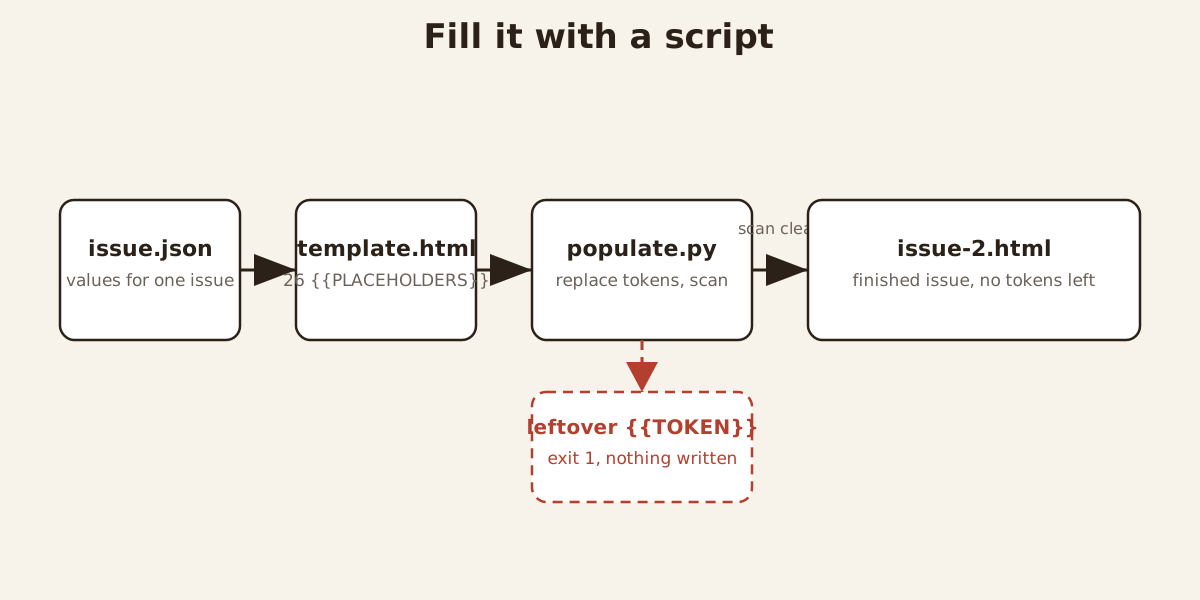
populate.py: it replaces every token, then exits with an error on any leftover instead of writing a broken issue.
#!/usr/bin/env python3
"""Fill the AssociationAI newsletter template from a JSON issue file.

Usage:
    python3 populate.py issue.json template.html output.html

The JSON file maps placeholder names (without braces) to values, e.g.:
    {
      "ISSUE_NUMBER": "2",
      "ISSUE_DATE": "October 10, 2026",
      "PREHEADER": "This week: ...",
      "LOGO_URL": "https://www.associationai.ai/images/newsletter/mascot.png",
      ...
    }

Every {{PLACEHOLDER}} in the template must have a matching key; the script
fails loudly if any placeholder is left unreplaced.
"""
import json
import re
import sys


def main():
    if len(sys.argv) != 4:
        print(__doc__)
        sys.exit(2)
    issue_path, template_path, out_path = sys.argv[1:4]

    with open(issue_path, encoding="utf-8") as f:
        values = json.load(f)
    with open(template_path, encoding="utf-8") as f:
        html = f.read()

    for key, value in values.items():
        html = html.replace("{{" + key + "}}", str(value))

    leftover = re.findall(r"\{\{[A-Z0-9_]+\}\}", html)
    if leftover:
        print(f"ERROR: unreplaced placeholders remain: {sorted(set(leftover))}",
              file=sys.stderr)
        sys.exit(1)

    with open(out_path, "w", encoding="utf-8") as f:
        f.write(html)
    print(f"Wrote {out_path} ({len(html)} bytes)")


if __name__ == "__main__":
main()- Write one
issue.jsonper issue, with every placeholder filled. This is a teaching example, not a case study. Name itissue-2.json; it is this tutorial’s worked example.
{
  "ISSUE_NUMBER": "2",
  "ISSUE_DATE": "October 10, 2026",
  "PREHEADER": "This week: a routine for checking AI drafts",
  "LOGO_URL": "https://www.example.org/images/newsletter/logo.png",
  "FEATURED_TITLE": "A Ten-Step Routine for Checking AI Drafts",
  "FEATURED_URL": "https://www.example.org/posts/fact-check-routine",
  "UNSUBSCRIBE_URL": "https://www.example.org/unsubscribe",
  "PHYSICAL_ADDRESS": "123 Main Street, Springfield, IL 62701"
}
Stage 3: render and check
- Generate the issue and open it in a browser:
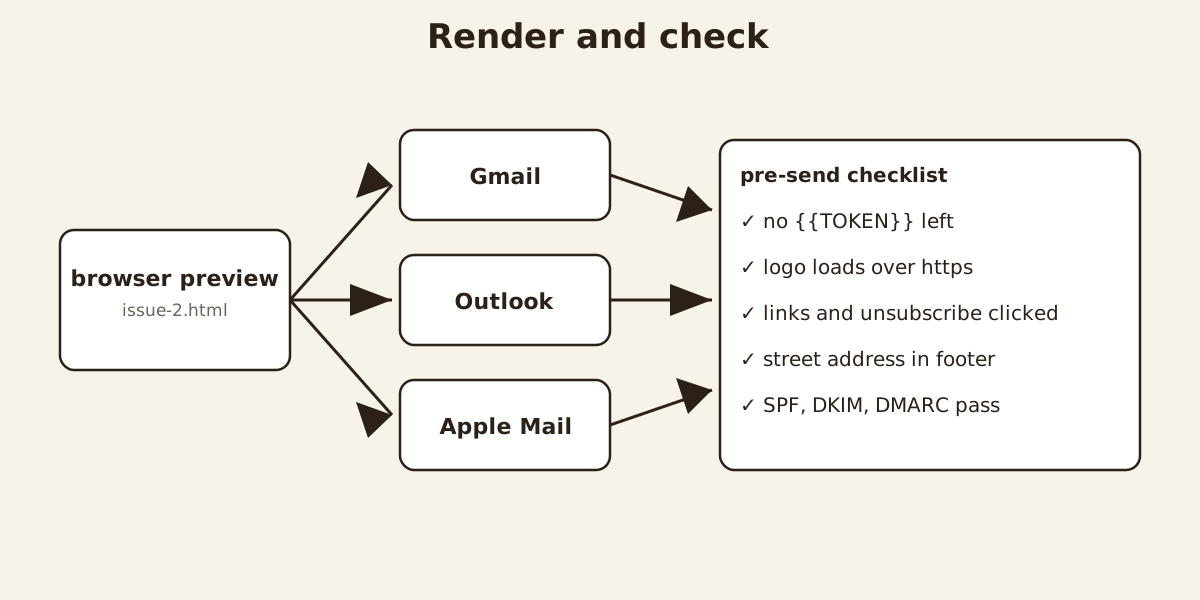
python3 populate.py issue-2.json template.html issue-2.htmlOpen issue-2.html and read it end to end: every link, the unsubscribe line, the footer address.
- Test-send to Gmail, Outlook, and Apple Mail, on desktop and on a phone; buttons and spacing break in different places in each one.
Stage 4: send it and grow the list
-
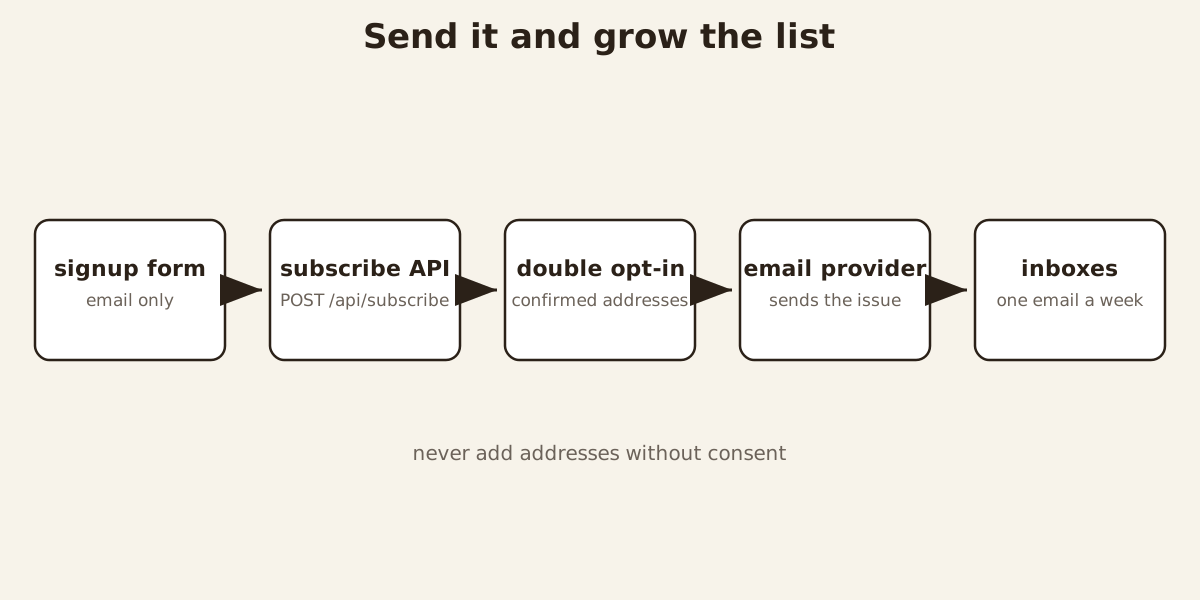
Choose the sending path: an email service provider for a real list. A personal Gmail account is the wrong tool for a bulk send, and Gmail and Workspace accounts cap daily sending per account, so check your plan’s quota first. For real subscribers, use an email service provider: it handles unsubscribes, bounces, and the plain-text alternative. Set up SPF, DKIM, and DMARC on the sending domain before the first real send.
-
Add the signup form that feeds the list. Forms do not work inside email, so the signup form lives on your website and the newsletter only links to it. This is the pattern behind the signup form on this site: it posts to the site’s own signup API.
<form action="/api/subscribe" method="post">
  <label for="newsletter-email">Email address</label>
  <input id="newsletter-email" type="email" name="email"
         required autocomplete="email" />
  <input type="hidden" name="source" value="newsletter-page" />
  <button type="submit">Subscribe</button>
</form>
<p>One email a week. Unsubscribe anytime.</p>
Ask for the address and nothing else, and never add addresses without consent.
- Keep the template healthy: version it, never send it raw, file each issue. Keep
template.html,populate.py, and the token table under version control, and file each rendered issue next to itsissue.json. Sending the template directly would mail readers literal{{PLACEHOLDER}}text.
Check your result before the first real send
Confirm every {{TOKEN}} is gone from the rendered HTML. Confirm the logo loads from its https URL in a private window. Click the button, every story link, and the unsubscribe link. Confirm the footer shows your organization’s real street address; the FTC’s CAN-SPAM compliance guide lists a valid physical postal address and a working opt-out as requirements for commercial email. Confirm the test copy renders in Gmail, Outlook, and Apple Mail, with SPF, DKIM, and DMARC passing on the sending domain.
Mistakes that break the send
Sending template.html itself, tokens and all, is the classic failure; the fail-loud script in step 4 exists because someone will eventually try it. A relative logo path renders as a broken image. An unsubscribe link never clicked in testing fails exactly when a reader needs it. Importing addresses without consent poisons the list before it starts. Editing the rendered issue instead of the template means the fix never carries forward.