Tutorial
IntermediateFrom Committee Notes to Action Items, Verified Line by Line
Turn messy committee notes into an action-item list where every item names an owner, a deadline, and its source line: extract with a grounding prompt, verify against the notes, get a human sign-off.
Time needed: Under an hour the first time, about twenty minutes once the prompt is saved
Before you start:
- The raw notes from one committee meeting
- An AI chat tool your association allows for drafting work
- The committee chair, or whoever signs off on the final list
Committee Meeting Notes Action Items Association staff
By the end of this tutorial you will turn one meeting’s messy notes into an action-item list where every item names an owner, a deadline, and the exact line it came from, and you will catch what the AI invents before the list goes out.
Committee notes are where follow-up goes to die: half-sentences, unnamed volunteers, deadlines nobody wrote down. Summaries feel like the fix, but they are where machines quietly add things never said: in 2021, researchers measuring summarization factuality found 74% of a baseline model’s sentences flagged as non-factual (Goyal and Durrett). Each item is a claim about what the committee agreed to, so each needs a receipt: the line it came from.
A meeting-summarization benchmark of 1,808 query-summary pairs over 232 meetings, committee meetings included, settled on a two-part method: locate the relevant span first, then summarize it (Zhong et al.). This tutorial follows that order: locate the line, then write the item. This is a teaching example, not a case study: the committee below is fictional.
Work it yourself: open the action-item verifier, run the tutorial’s worked example through the verify-every-line check — keep, fix, or cut each item against its quoted source line — then sign off. The extraction prompt and printable checklist ship free with your email.
Stage 1: get the notes ready
-
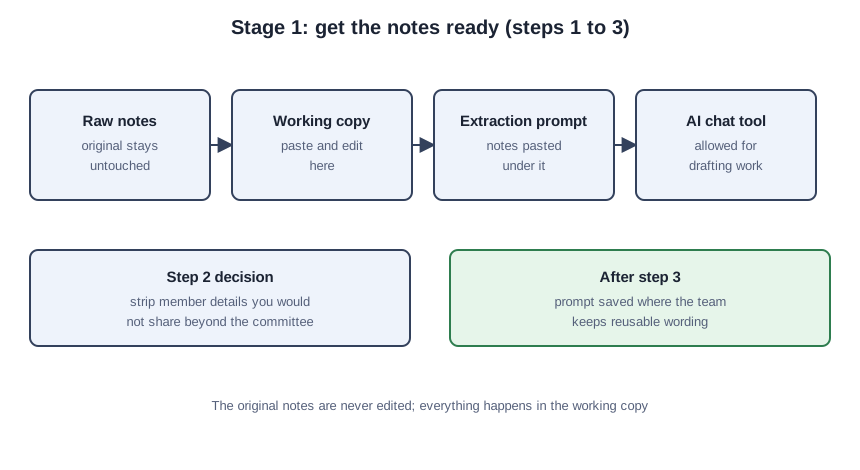
Copy the raw notes into a working document. Leave the original untouched as the record.
-
Decide what the AI tool gets to see. If the notes hold member details you would not share beyond the committee, strip those lines first. The member data tutorial walks through that call.
-
Paste the notes under the extraction prompt. Save the prompt where your team keeps reusable wording.
From the notes below, list every action item with exactly these four fields:
- Action: what was agreed, in the committee's own words where possible
- Owner: the person the notes name; write "unassigned" if the notes name no one
- Deadline: the date the notes state; write "none stated" if the notes state none
- Source: the exact line from the notes, quoted word for word
Rules: do not invent owners, deadlines, or details. If a line is unclear, quote it and mark the item unclear.
Meeting notes:
[paste notes here]
Stage 2: extract with receipts
-
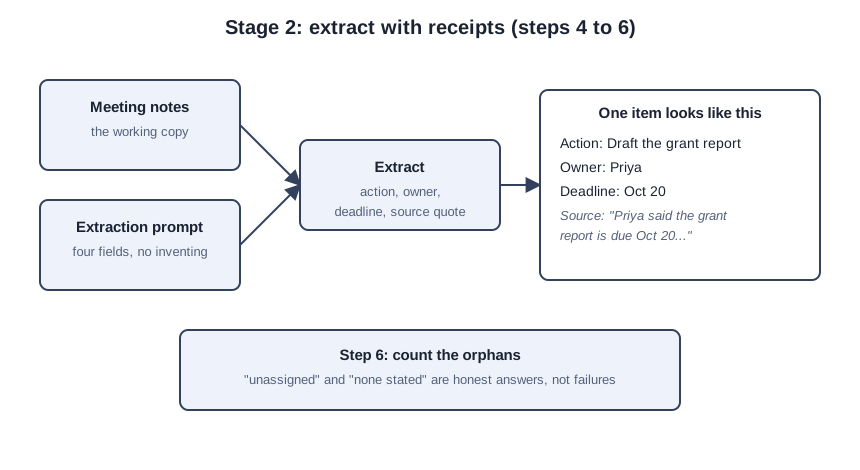
Run the extraction and keep the source quotes attached. Do not let the tool drop the quotes to make the list prettier; they are what you check in stage 3.
-
Compare your output with the example below, from the fictional Cedar Valley Arts Council programs committee.
Programs committee, Sept 15 (notes by Dana)
- Priya said the grant report is due Oct 20 and she will draft it
- Marco: venue contract for the spring gala still unsigned, follow up with Riverside Hall
- everyone agreed the membership flyers need a redesign (no one volunteered)
- Dana to check the insurance renewal date
- Priya will ask Tom about the donor wall wording
Sample output (example):
- Action: Draft the grant report | Owner: Priya | Deadline: Oct 20 | Source: "Priya said the grant report is due Oct 20 and she will draft it"
- Action: Follow up with Riverside Hall on the unsigned gala venue contract | Owner: Marco | Deadline: none stated | Source: "Marco: venue contract for the spring gala still unsigned, follow up with Riverside Hall"
- Action: Redesign the membership flyers | Owner: unassigned | Deadline: none stated | Source: "everyone agreed the membership flyers need a redesign (no one volunteered)"
- Action: Check the insurance renewal date | Owner: Dana | Deadline: none stated | Source: "Dana to check the insurance renewal date"
- Action: Ask Tom about the donor wall wording | Owner: Priya | Deadline: none stated | Source: "Priya will ask Tom about the donor wall wording"
Note the traps: the flyers have no owner, three items have no deadline, and Tom is not the donor-wall owner, Priya is. A good extraction leaves that visible.
- Count the orphans before judging the list. “Unassigned” and “none stated” are not failures; they show what the meeting left undecided.
Stage 3: verify every line
-
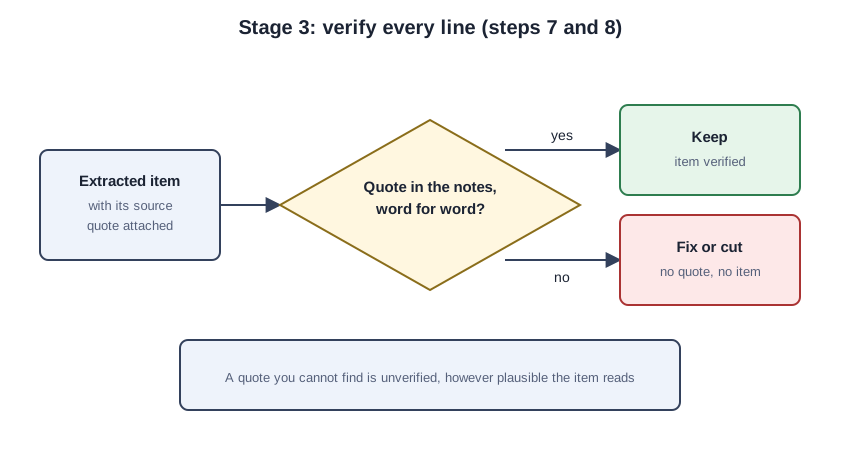
Open the notes and check each quoted line word for word, one item at a time. A quote you cannot find is unverified, however plausible it reads.
-
Fix or cut failures. An invented owner becomes “unassigned” or the item is cut, an unstated deadline becomes “none stated”, a drifted quote gets reworded to match. The fact-check routine teaches this check for member-facing content; here the source is your own notes.
Stage 4: sign off and send
-
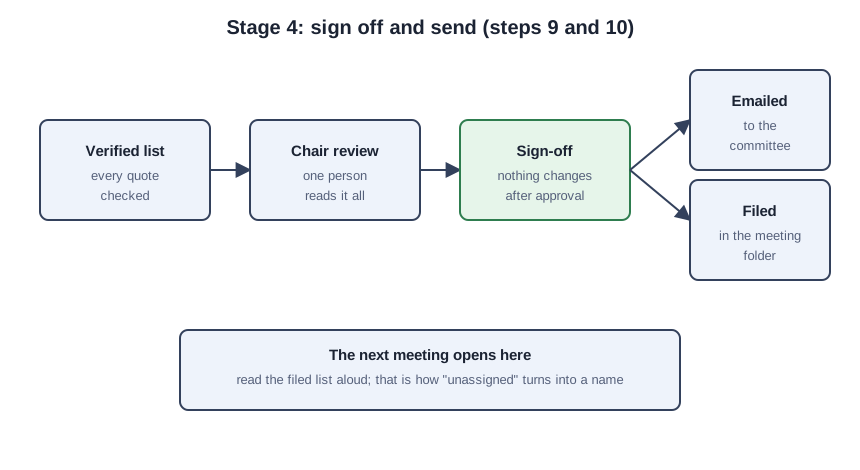
Get the chair’s sign-off on the checked list, and change nothing after approval. The FTC’s 2023 guidance warns businesses against unsubstantiated claims about what their AI does; your list claims what the committee agreed to, and the checked quotes are the substantiation.
-
Email the list to the committee and file it where the next agenda will find it. The next meeting opens by reading it aloud, which is how “unassigned” turns into a name.
Check your result: the five-line audit
Run the audit on the finished list; any failing line sends you back to the step that owns it.
- Every item names an owner or says “unassigned.”
- Every item names a deadline or says “none stated.”
- Every item carries an exact quote, and every quote appears in the notes.
- Nothing in the list came from outside the notes: no invented owners, no invented deadlines, no borrowed context.
- The chair approved the list, and a copy sits in the meeting folder.
Mistakes that produce a confident-looking list
Giving an orphan task an owner is the first mistake: “everyone agreed the flyers need a redesign” names nobody, and typing a name invents accountability the committee never gave. A deadline the notes never stated is the second. Deleting the source quotes when you reformat for email is the third: without them, the next meeting has nothing to check. Approving the list from the AI output without opening the notes is the fourth. Sending it before the chair signs off is the fifth: no signature, no ownership.