Article
BeginnerWhose Model Is It? Quantized Copies and the Download Checklist
Quantized copies shrink AI models to fit weak hardware, but most are uploaded by strangers. A five-check download list for association staff.
AI Models Model Safety Downloads
Sooner or later, someone on your staff will be told to download an AI model. A tutorial says to grab a model and run it on the office computer. A volunteer offers to set up a drafting helper on an old desktop. The link leads to a model hub, a site hosting thousands of downloadable models, and the page looks reassuring: a familiar model name, a tidy description, a logo that looks like the lab’s.
That polish proves less than it appears. Researchers at the Singapore University of Technology and Design evaluated more than 25,000 models from Hugging Face and other sources, because the model-hub supply chain is susceptible to attacks that execute arbitrary code on a trusted machine the moment a model loads, according to their paper. The page can look official while the file does something else.
Before you click download, it helps to know that two very different things hide behind the same model name.
The lab model and the quantized copy
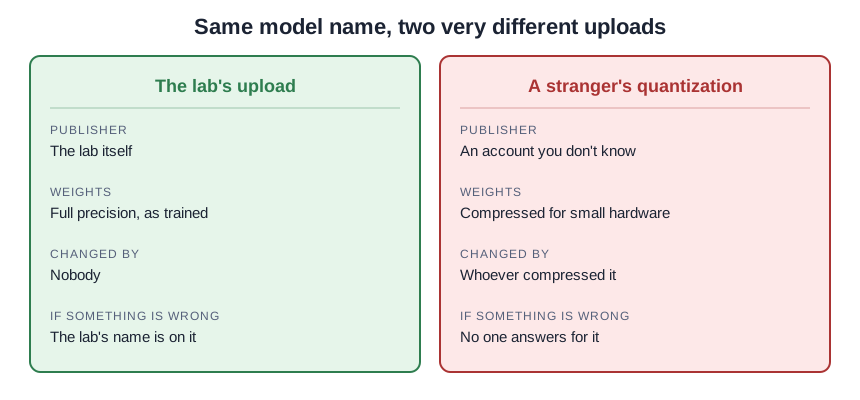
A lab model is the original: the full weights, published by the lab that trained the model, at the precision the lab used. Think of it as the master recording.
A quantized model is a compressed copy. Someone took the lab’s weights and rounded the numbers down, from 32-bit precision to 8-bit or even 4-bit, so the file shrinks and the model runs on weaker hardware. The technique is legitimate and well studied: University of Washington researchers showed that 8-bit inference can cut the memory a model needs in half while keeping full-precision performance, in LLM.int8(). They had to invent careful methods to pull it off, because naive rounding degrades the model once it gets large.
Here is the part that matters for your download decision: the lab rarely makes the quantized copy. Compressing and re-uploading is something practitioners do to models they reuse, which is why one model name on a hub returns the lab’s release plus a crowd of shrunken versions from accounts you have never heard of. Same name on the page, very different provenance in the file.
Open shelves, no signatures
Model hubs are open registries, and the shelves show it. Purdue and Loyola researchers who studied reuse on Hugging Face found missing documentation, claimed performance that did not match actual performance, and what they called a lack of signatures in the model supply chain, in their ICSE 2023 study. No signature means no reliable way to confirm who made a file or whether it changed since upload. A logo on the repo page is decoration, not verification, and it stays decoration no matter how familiar the brand looks.
The before-you-download checklist
Read the upload before you trust it. Five checks, in order.
- Who published it? The uploader name is the whole game. The lab’s own account, or a partner the lab names, is the first choice. A username you do not recognize publishing the lab’s model is a stranger’s copy, whatever the page looks like.
- Does the page say what it is? A serious upload carries a model card: what the model is, where the weights came from, what was changed, how it was tested. No card, no download.
- What are the files? Open the file list. Some model files use Python’s pickle format, and Python’s own documentation warns that unpickling untrusted data can execute arbitrary code during unpickling. If you cannot tell what a file does, do not run it.
- What does the license allow? The page should state plainly what you may do with the model. A missing or contradictory license is a stop sign, especially for an organization.
- Do the signals add up? A brand-new account, a name one letter off from the lab’s, big download claims with no history, comments asking whether the file is safe. Any one of these is a reason to walk away.
This is a teaching example, not a case study. You search a hub for a well-known open model and get two results: the lab’s account offering full weights with a detailed model card, and an unfamiliar username offering a file half the size, labeled quantized, with no card and weight files in pickle format. The second is tempting because it fits your hardware. It is also the one you know nothing about: who compressed it, what the compression changed, and what else sits inside the file.
What goes wrong, in order of likelihood
First, the copy underperforms its name. The compression was sloppy or the uploader exaggerated, and the “same model” answers worse than the lab’s. The Purdue and Loyola team found claimed-versus-actual performance gaps across the hub, so this is the common case, not the exotic one.
Second, the file carries something extra. A pickle-format weight file runs code at load time, on your machine, with your permissions. That is the attack the Singapore researchers built their detector for.
Third, there is nobody to answer for it. The uploader is a username, and a supply chain without signatures offers no reliable way to trace a tampered file back to its source. A bad file is discovered after the damage, not before.
Make the lab release your default
For association staff, the first choice should be the lab’s own release through the lab’s own channels, not a stranger’s compression. That is also our standing rule for anything we put on our own pages: the publisher must be the lab that made the model or a named partner we trust, as we wrote in our piece on three routes to an AI assistant.
This is not a dismissal of quantization. Compressed models exist for an honest reason: most association offices do not have the hardware the full model wants, and a careful quantization is what makes local AI possible on ordinary machines. Use one when the hardware demands it, from a publisher you can verify, after running the checklist. Just do not make the stranger’s copy your first choice because it was the first search result.
Apply the same suspicion everywhere, logo or not. A familiar brand on the repo page, a slick description, a badge that looks official: none of it is verification. Verification is the publisher name matching the lab, the model card describing the file, and a file list you understand. Anything less is a download you are taking on faith.
Sources
- Dettmers et al.: LLM.int8() — 8-bit Matrix Multiplication for Transformers at Scale (NeurIPS 2022)
- Nambiar, Pradhan, Soremekun (Singapore University of Technology and Design): Malicious ML Model Detection by Learning Dynamic Behaviors (2026)
- Python Software Foundation: pickle — Python object serialization (security warning)
- Jiang et al. (Purdue / Loyola): An Empirical Study of Pre-Trained Model Reuse in the Hugging Face Deep Learning Model Registry (ICSE 2023)
Sources
- Dettmers et al.: LLM.int8() — 8-bit Matrix Multiplication for Transformers at Scale (NeurIPS 2022)
- Nambiar, Pradhan, Soremekun (Singapore University of Technology and Design): Malicious ML Model Detection by Learning Dynamic Behaviors (2026)
- Python Software Foundation: pickle — Python object serialization (security warning)
- Jiang et al. (Purdue / Loyola): An Empirical Study of Pre-Trained Model Reuse in the Hugging Face Deep Learning Model Registry (ICSE 2023)