Article
BeginnerThree Ways to Give Your Staff an AI Assistant
Free in the browser, free on the desktop, or twenty dollars a month: three honest routes to AI for association staff, matched to what each person actually needs.
Local AI Subscriptions Operations Privacy
Every executive director eventually faces the same question from the board: what should we actually pay for AI? Meanwhile the staff are already answering it themselves: some paste member data into personal free accounts, and the rest use nothing at all. Both are problems. The honest answer is three routes, matched to what each person actually needs: free in the browser, free on the desktop, or twenty dollars a month.
Route 1: In the browser, free, zero install
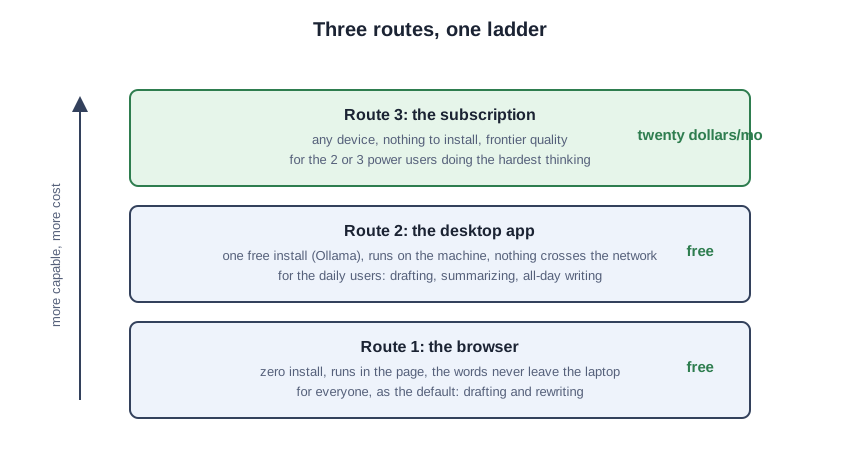
Modern browsers can run a small AI model directly on the laptop, no account and no download beyond the model itself. We built a working version of this on our own site: the local model lab loads Qwen3-1.7B, a 1.7-billion-parameter open model, and runs it entirely in the page. The browser builds there are compiled and published by the WebLLM team themselves, from the labs’ original weights, which matters because anyone can upload a model to Hugging Face and anyone does. Our rule: a model goes on our page only if it was published by the lab that made it or a named partner we trust. No stranger’s upload, ever. Draft an email, rewrite a paragraph, summarize a committee report: the words never leave the machine, because there is no server involved, which is why this route matters for associations handling member data.
The tradeoff is capability: a 1.7-billion-parameter model is a good writing helper and a poor analyst. It drafts well, summarizes short documents well, and loses the thread on long reasoning. For most staff, most days, that is exactly the job.
Who gets this route: everyone, as the default. It costs nothing and asks nothing of IT.
Route 2: On the desktop, free, one install
The next step up: a free desktop app (Ollama is the common one) running a larger open model such as Qwen3 4B or 8B, or Microsoft’s Phi-4-mini. Same privacy story as the browser route: everything runs on the machine, nothing crosses the network. Same trusted-source rule: Ollama’s library is curated by the Ollama team from the labs’ official weights. If you ever outgrow a desk-side machine, the chipmakers keep official libraries: NVIDIA’s NIM service and model organization, AMD’s model organization and Ryzen AI model zoo, and Meta’s Llama organization (whose models need a license click-through, so they are not one-click loads). The difference is quality: a 4-to-8-billion-parameter model holds longer documents in mind and reasons more carefully, close enough to early commercial models for everyday staff work.
The cost is hardware comfort, not money: these models want a decent laptop, ideally 16 gigabytes of memory, and they answer more slowly than a chatbot in the cloud. One install, and the staff member has a private assistant that never phones home.
Who gets this route: the daily users. The membership coordinator who drafts all day, the events person writing session descriptions, anyone who reaches for AI ten times before lunch.
Route 3: The subscription, twenty dollars a month
For the power users, pay. Claude Pro and ChatGPT Plus both sit at twenty dollars a month per seat, with far more capable models than anything that runs on a laptop; the heaviest users have a one-hundred-dollar tier above that. What the money buys is simple: frontier quality with zero hardware questions, on any device.
The tradeoff associations must take seriously: prompts go to someone else’s servers. Read the provider’s data terms before member PII goes into the prompt box, and keep the local routes above for anything sensitive. Our rule of thumb: if you would not email it to a vendor, do not paste it into a subscription chatbot.
Who gets this route: two or three power users. The communications director, the policy analyst, the person writing the grant reports.
Matching people to routes
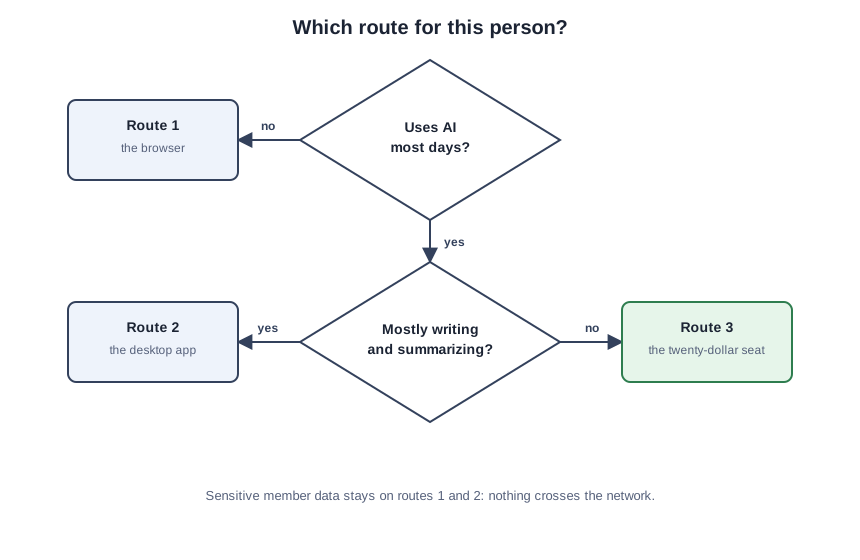
Walk the staff list once with three questions:
- Uses AI most days? No: route 1. Nothing to install, nothing to buy, privacy airtight.
- Yes, mostly writing and summarizing? Route 2: one install, better quality, still free, still private.
- Doing the hardest thinking: research, analysis, long documents? Route 3: the twenty-dollar seat. Two or three of these, not twenty.
Most associations land with nearly everyone on route 1, a handful on route 2, and two or three paid seats. That is not a compromise; it is the shape of actual need. The mistake is buying twenty subscriptions because the board heard AI is important, or buying zero because the budget is tight, while staff quietly use personal accounts on member data. The routes above cost less than one conference registration and close the real risk: the ungoverned free account.
What to tell the board
The board question was what to pay for. The answer: nearly nothing, on purpose, plus twenty dollars a month times the number of power users you can name individually. If you cannot name them, you do not need the seats yet. The local routes are free, private, and real today; the paid route is for the few whose work justifies it. The longer version, with the line-item math, is a separate piece; this one is the map.