Tutorial
BeginnerCheck a Member Notice for Plain Language Before Anyone Rewrites It
Paste a member notice into a browser lab, read counts for long sentences, passive phrasing and hard terms, then have a second person confirm that the rewrite kept the meaning.
Time needed: About 30 minutes
Before you start:
- A member notice you can copy as plain text, or use the sample notice
- A recent desktop browser and the document where you edit notices
- A second person to compare your rewrite with the original
Plain Language Member Communications Notices Quality Check
By the end of this tutorial you will have counts for one member notice, a rewrite checked against the same counts, and a second person’s confirmation that the rewrite still says what the original says.
Try it now: the plain-language notice check counts the sentences in text you paste and flags long sentences, possible passive phrasing and hard terms. Nothing you paste is sent anywhere.
Why count first, and why a count is not enough
A U.S. Department of Education statistics page on the 2023 adult skills survey reports that the share of adults at the lowest literacy level, Level 1 or below, rose from 19 percent in 2017 to 28 percent in 2023 (page read October 2026). It covers U.S. adults ages 16 to 65, not association members, so it says nothing about your own list. It is a reason not to assume that every reader gets through a dense paragraph.
The CDC’s plain language page, updated July 21, 2025, advises an average of 20 words per sentence, one idea per sentence, the active voice and words your audience knows. A 1998 drafting handbook from the Office of the Federal Register, written for regulations, suggests about 15 words on average and going past 30 only when the sentence ends in a parallel list. They differ, so the 20 and the 30 in the lab are placeholders we chose, and no source says they suit member notices.
The lab gives no reading grade. A JAMA Network Open research letter by University of Sydney authors ran ten health web pages through eight online calculators and reports that the same text scored up to 12.9 grade levels apart, even with the same formula. The CDC’s 2014 Clear Communication Index guide, written for public health materials, calls readability formulas “inadequate to assess communication effectiveness.”
Check a notice in eleven steps
- Copy the notice as plain text. Take it from the version members receive, and keep that file unchanged as your original.
- Record three settings first. They are the most words per sentence on average, the length above which one sentence is flagged, and a word list of hard terms with plainer options. The lab starts at 20, 30 and 14 example terms. Add the terms your own notices use.
- Paste the notice into the first box of the lab. Each box reads up to 50,000 characters, so check a long notice one section at a time.
- Press Check. The counts and flags appear below the buttons.
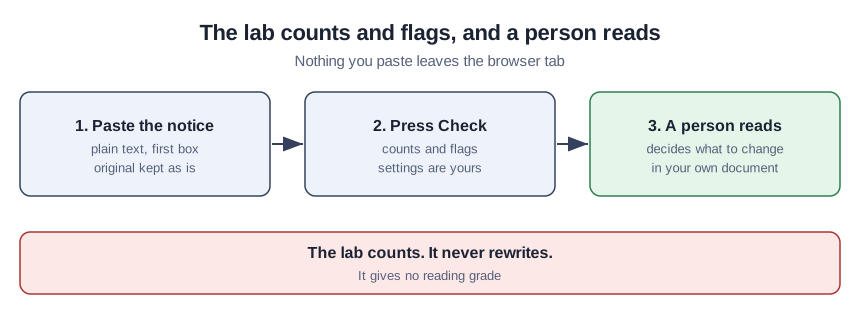
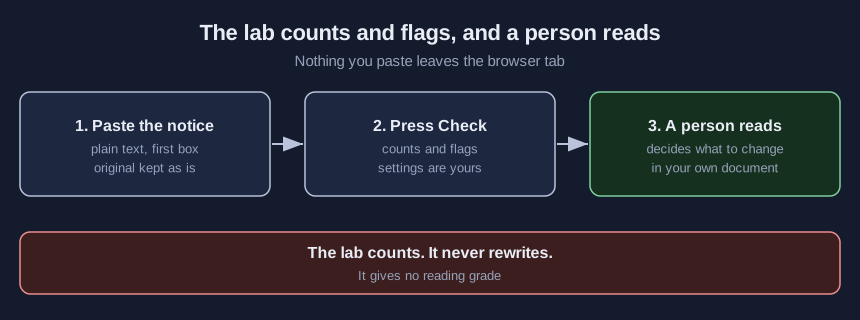
- Read the counts. The table shows sentences, words, the average, the longest sentence, how many sentences pass your limit and how often the notice says “you” or “your”. The row of words in each sentence tells you which sentence to open first.
- Split every long sentence. Edit in your own document and give each sentence one idea.
- Read each possible passive flag. Say who does what only where it reads better. The flag is a guess from a simple pattern, so it can flag a sentence that is fine and miss one that is not.
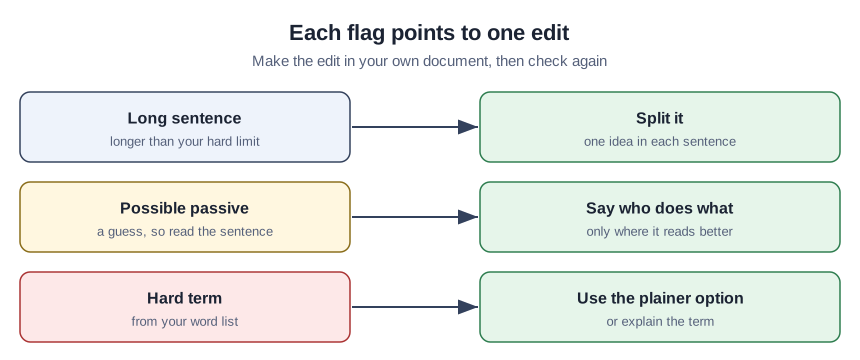
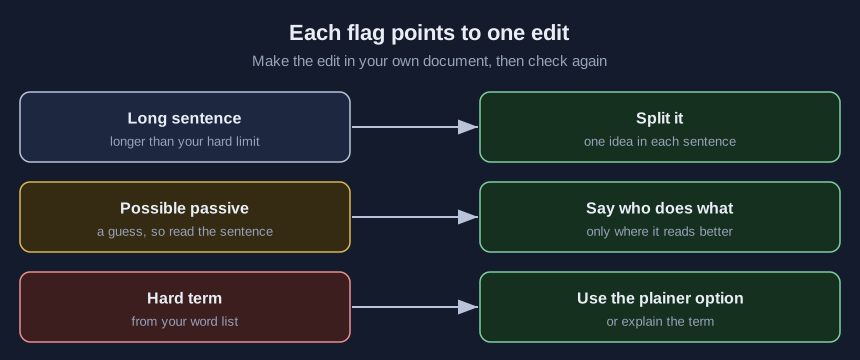
- Replace the hard terms. Use the plainer option from the list, or explain the term. The lab matches whole words only, so “remit” does not catch “remittance”. Add each form you find.
- Paste the rewrite into the second box.
- Press Check again. The table shows both versions side by side. Counts within your settings only mean the rewrite can go to a person.
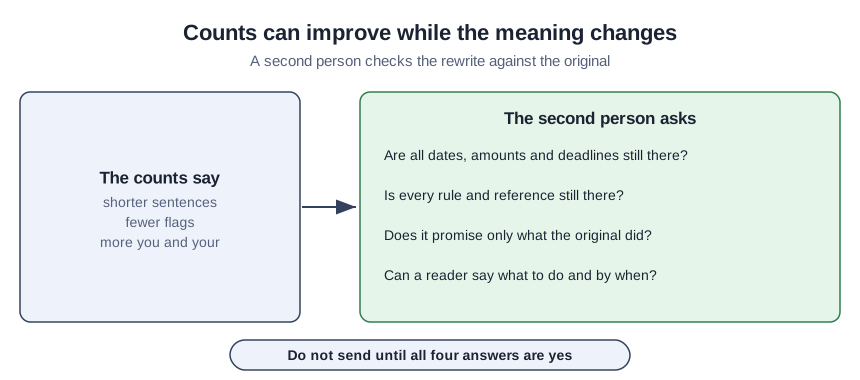
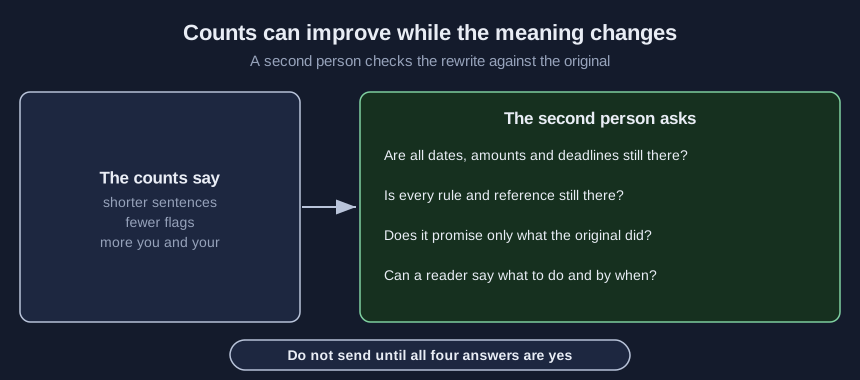
- Ask a second person to compare the rewrite with the original. Give them the review checklist from the kit and ask what was lost and what was added.
A teaching example: one invented dues notice
Everything in this section is made up for this tutorial, with no real association behind it, so it shows what the counts do and not how your notices will behave.
The dense notice is two sentences and 84 words, an average of 42, and one sentence runs 66 words. The lab flags seven possible passive phrases, such as “be notified” and “been terminated”, and six hard terms, such as “pursuant to”, “delinquent” and “in the event that”. It never says “you”.
The rewrite is five sentences and 48 words, an average of 9.6, with no flags and “you” five times. By the counts it is far better. A person reading both finds that it drops the reference to Article IV of the Bylaws and says a member can rejoin at any time, which the original never says. The counts cannot see either change. The lab also missed “remittance” and “terminated” in the original, because the word list held “remit” and “terminate”.
Confirm the rewrite is ready to send
Three things should be true before a notice goes out. The rewrite’s counts sit within your settings, or the log says why a flag stays. The second person found nothing lost and nothing added. One reader outside your staff has said in their own words what to do and by when. Save the settings, both sets of counts, the date and the reviewers’ names in the log from the kit.
Where a clean count misleads you
The first mistake is treating a good count as a clear notice, when the CDC guide says short words and sentences are not sufficient for clear communication. The second is letting the person who wrote the rewrite also judge its meaning. The third is adjusting your limits after the counts appear so that the notice passes. The fourth is splitting a long sentence and dropping the condition that made it long. The fifth is asking a chatbot for the rewrite and skipping the meaning check, which a routine for checking AI drafts is there to prevent.
What the notice kit holds
The download has the lab page to run on your own computer, a script with the same counts, the sample notice and its rewrite, a word-list template, a review checklist and a before-and-after log. Get it with your email on the demo page.
Sources (5)
- U.S. Department of Education, National Center for Education Statistics: Highlights of U.S. National Results, PIAAC 2023 (government statistics page, undated, page read October 2026)
- Centers for Disease Control and Prevention: Plain Language Materials & Resources (government guidance page, July 21, 2025)
- Office of the Federal Register: Federal Register Document Drafting Handbook, Making Regulations Readable (government drafting handbook chapter, October 1998 revision)
- Mac, Ayre, Bell, McCaffery and Muscat: Comparison of Readability Scores for Written Health Information Across Formulas Using Automated vs Manual Measures (JAMA Network Open research letter, 12 December 2022)
- Centers for Disease Control and Prevention: CDC Clear Communication Index User Guide (government user guide, July 2014)