Tutorial
AdvancedOwn Your Association's Data Platform
Create a Google Cloud project, switch on BigQuery, and pick one of three branches: staff dashboards, member sharing, or your own member platform.
Time needed: About 90 minutes for the setup; the branch decision takes one meeting
Before you start:
- A Google account with permission to create Cloud projects (or the IT contact who holds it)
- No credit card to start: the sandbox path needs none
- One colleague who knows what data the association actually holds
Bigquery Google Cloud Data Platform Analytics Member Data
By the end of this tutorial your association will own a working data platform: a Google Cloud project with BigQuery switched on, and one of three sharing branches running on it. The data sits on your ground, under your keys: nothing of yours lives inside a vendor’s system to hold.
Track it live: our data platform setup checklist turns the steps below into an interactive checklist, and the starter kit (setup checklist plus branch-decision worksheet) is free with your email. The build itself happens in your Google Cloud console.
Step 1: Create the Google Cloud project
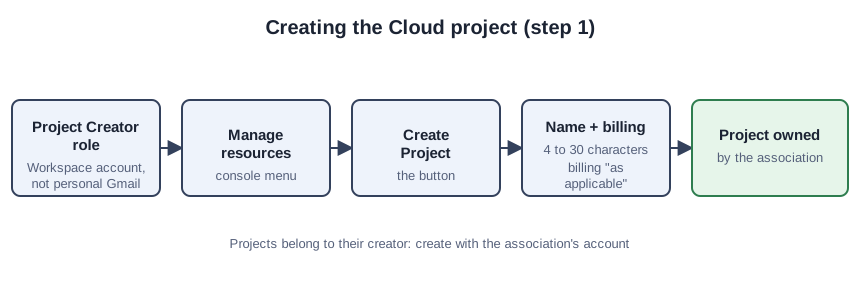
Everything Google sells to organizations hangs off a Cloud project: the billing, the permissions, the data. Open the Cloud console, go to Manage resources, and choose Create Project. Name it for your successor (acme-association-data, not test-final-2); names run 4 to 30 characters, per Google’s project documentation. Pick the billing account “as applicable” (skip it for the sandbox in step 2) and create it. Creating projects requires the Project Creator role, which new Workspace and Cloud Identity domains hold by default; if the button is greyed out, your IT contact has the role. Use the association’s Workspace account, never a staffer’s personal Gmail: projects belong to their creator.
Step 2: Switch on BigQuery, and make the honest choice
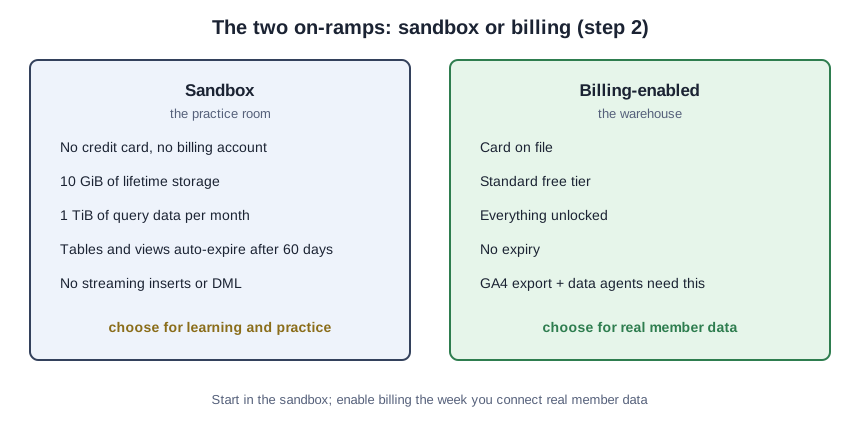
Open BigQuery Studio inside your new project. Google offers two on-ramps, and they are not the same thing.
The BigQuery sandbox lets you experience BigQuery without providing a credit card or creating a billing account for your project. No card, no billing account, no invoice, ever. The limits, from the same page: 10 GiB of lifetime storage (deleting tables does not give it back), 1 TiB of query data per month, tables and views that auto-expire after 60 days, and no streaming inserts, DML statements, or Data Transfer Service. It is a practice room, not a warehouse.
The billing-enabled project is the warehouse: card on file, standard free tier, everything unlocked. The GA4 export requires a valid payment method on the Cloud project to run at all, and data agents cannot be built in the sandbox because they require billing enabled (the companion tutorial covers that build). Start in the sandbox if you are learning; enable billing the week you connect real member data or build the data agent.
Step 3: Pick one of three branches
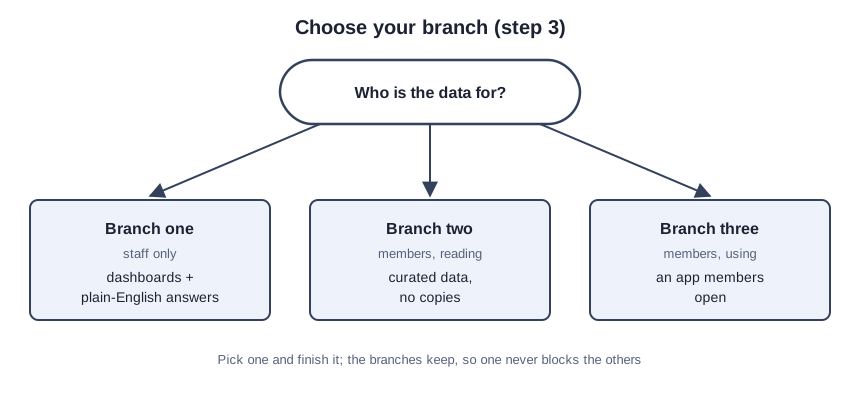
One project, three ways to share it. Who is the data for?
- Staff only: dashboards and plain-English answers on your own numbers. Take branch one.
- Members, reading: chapters see curated data without copying it. Take branch two.
- Members, using: an app members open, like a data explorer or benchmarking tool. Take branch three.
Pick one and finish it. The branches keep, so one never blocks the others.
Step 4: Branch one, dashboards for your staff
This branch is a pointer, not a rebuild. Our companion tutorial Build the Data Agent Your Dashboard Chats With walks the full click-by-click. On publish, select Looker Studio as a publishing option and the agent appears for your staff on the chat page, answering typed questions against your BigQuery tables. The data never leaves your project; the dashboard is a window, not a copy.
Step 5: Branch two, share data with members
Analytics Hub, BigQuery’s data exchange, lets you publish datasets the way a library lends books: members read, nobody takes the shelf home. Create a data exchange in your project, add a listing for the dataset, and subscribers get a read-only linked dataset they query in place. Nothing is replicated, and the exchange stays private by default.
You keep the controls: authorized views and datasets, column- and row-level security on shared data, and egress restrictions that can block copying, cloning, exporting, and CREATE TABLE AS on shared data. One exchange supports up to 1,000 linked datasets per shared dataset, and Google charges no additional cost for managing data exchanges or listings. On compliance, the same page states verbatim: “BigQuery sharing, as part of BigQuery, complies with the following compliance programs: ISO 27001, ISO 27017, ISO 27018, SOC 1, SOC 2, SOC 3, PCI DSS, Penetration Testing, HIPAA, HITRUST.” SOC 2 is the one your board will ask about (the term is SOC 2, not “SOC II”), and Google’s compliance page notes the core Google Cloud SOC 2 Type II reports are issued quarterly.
Start with one dataset your chapters beg for; list it, pilot with one friendly chapter, and let their requests write the roadmap.
Step 6: Branch three, build the member platform
One honest paragraph. Firebase Studio, Google’s cloud-based environment for building full-stack apps, is sunsetting: Google’s own documentation says existing workspaces keep working, but new workspace creation and user signup are no longer supported. We do not teach tools you cannot sign up for, so this branch teaches Google’s named migration path: AI Studio.
AI Studio’s Build mode turns a natural-language description into a web app: React frontend, Node.js server runtime, Firebase Firestore and Firebase Authentication (“Sign in with Google”) provisioned automatically. Your API key stays a server-side secret that never ships in client-side code, the app deploys to Cloud Run, and for storage Google notes you can use “any storage solution that you can connect to over a network,” which is how your BigQuery warehouse plugs in behind the app.
The honest cost paragraph. Deploying to Cloud Run means Cloud Run pricing may apply based on usage; shared apps count API calls toward your usage limits, and paid models cost extra. Against that, the Firebase services underneath carry no-cost quotas covering most association volumes: Firebase’s pricing page lists 50,000 monthly active users for Authentication, 1 GB stored with 50,000 reads and 20,000 writes per day for Firestore, 2 million function invocations per month, and 10 GB of Hosting storage.
Step 7: Run the ownership check
Ten minutes, five questions, all yes before you call it done:
- The project lives on the association’s Workspace account, not a personal Gmail.
- You recorded the sandbox-or-billing choice and the reason.
- One branch is finished: a dashboard staff can open, a listing a member can subscribe to, or an app a member can sign into.
- A second person holds Owner access. One keyholder is a bus factor.
- You reviewed who can export what: egress restrictions on shared data, no API keys in client-side code.
A filled-in decision, as an example
This is a teaching example, not a case study. A fictional 1,800-member trade association with six staff, no developers, and a part-time IT contractor fills in the branch worksheet like this: the data is renewal counts, event attendance, and email engagement; the users are the executive director and the board; the question is which programs earn their keep. Branch one. The contractor enables billing (the data agent needs it) and builds the agent from the companion tutorial. Six months later the chapters ask for the attendance data, and that becomes branch two’s pilot, already sitting in the same project.
Mistakes that are cheap now and expensive later
The personal-Gmail project. The most common mistake and the hardest to unwind; migrate now while the project is small.
Building all three branches at once. The branches keep; finish one, then expand.
Treating the sandbox as production. Sixty days later your tables expire mid-board-meeting. The sandbox is the practice room.
Sharing the raw dataset instead of a listing. A shared dataset with no egress restrictions is a copy waiting to happen. The listing, the authorized view, and the egress block are the sharing; the dataset alone is exposure.
Pasting the API key into frontend code. Build mode keeps it server-side for a reason; every member’s browser would carry your key.
Your data, on your ground, under your keys. Vendors can compete for your business from now on instead of holding your history for ransom, because the history was never theirs to hold.