Tutorial
Write a One-Page AI Acceptable-Use Policy Your Staff Will Actually Use
Draft, test, and date a one-page AI acceptable-use policy for association staff: tools, data that never goes in, off-limits uses, checking and labeling, who to ask, and when it gets reviewed.
Time needed: About an hour and a half for a first draft, plus a short test with two colleagues
Before you start:
- A rough list of the AI tools staff already use, or ten minutes to ask around
- The confidentiality section of your employee handbook
- The name of the person who will answer staff questions about AI
- Any data rules your association already has
AI Policy Operations Executive Association staff
By the end of this tutorial you will have a one-page policy that tells staff which AI tools and accounts they may use, what data never goes in, which uses are off limits, who checks the output, when to label it, who to ask, and when the page gets reviewed. Plan on about an hour and a half for the first draft, and keep your tool list, your handbook’s confidentiality section, and the name of your AI contact within reach.
If your association has nothing written yet, you have company. When FSAE and the Association Societies Alliance surveyed 305 respondents, 33% said their association had no AI policy, 29% said one was in the works, 25% said they needed one, and 13% said they had one. Independent Sector’s guidance for nonprofits calls a clear AI governance policy “a key piece” of using AI well and reducing risk, and one page that staff actually read is a practical way to get that piece in place.
Eight steps to a page staff can follow
Stage 1: gather what the page must reflect
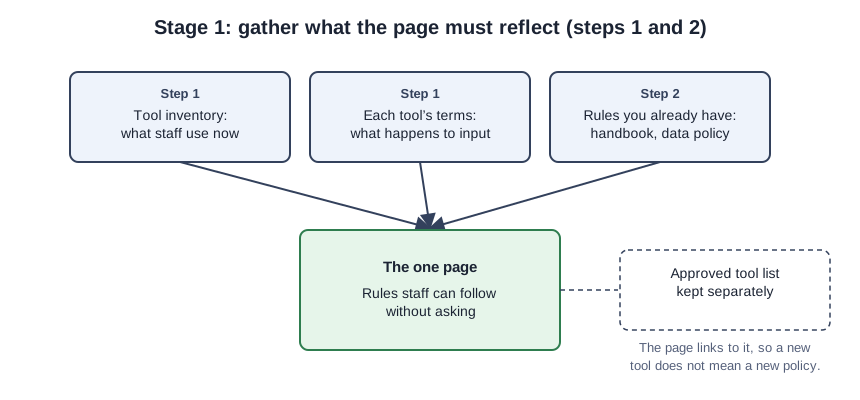
- Inventory the tools and keep the approved list separate. NIST’s Generative AI Profile suggests enumerating an organization’s generative AI systems into an AI system inventory. We would keep that list in its own document that the policy links to, so adding a tool never means reissuing the policy. While you build it, read each tool’s terms, since NIST’s AI Risk Management Framework expects policies to cover risks from third-party software and data. Ann Link’s Associations Now article warns that content entered into these tools, even paid versions, could “exit” the organization.
- Collect the rules you already have. Independent Sector puts it directly: “Data policies are the foundation of AI governance policy.” In our view the AI page should point to your handbook’s confidentiality terms and any data rules instead of restating them.
Stage 2: write the rules
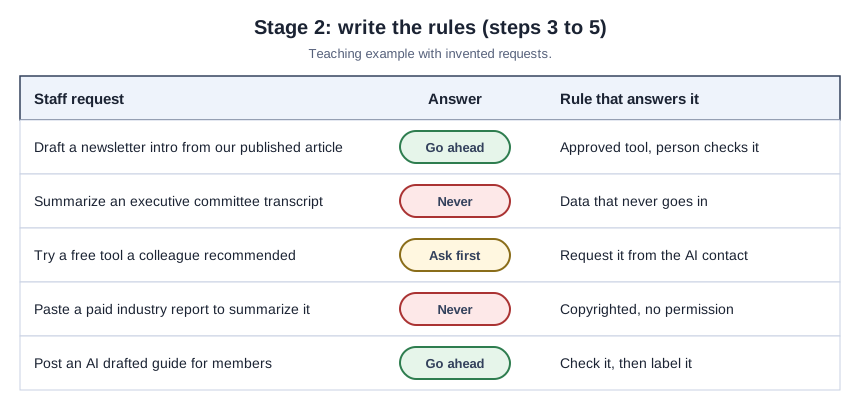
- Name the data that never goes in. Link’s article notes that financial or HR information, member information, copyrighted material, and executive committee transcripts are generally barred, and that policies often list the barred documents and data explicitly. For member records, send staff to our member-data tutorial rather than repeating its method on the page.
- List the uses that are off limits. NIST’s Generative AI Profile recommends acceptable use policies that address illegal use, so start there. ASAE’s own staff policy adds a copyright rule worth borrowing: no copyrighted material goes into an AI tool without authorization.
- Say who checks output and when to label it. Link writes that any policy should cover copyright, fact-checking, and data security at a minimum, and she notes that policies commonly require AI-generated content to be labeled. Our suggestion is to require labels on member-facing work where AI did meaningful drafting and to leave internal drafts unlabeled, so the rule stays believable.
Stage 3: keep the page alive
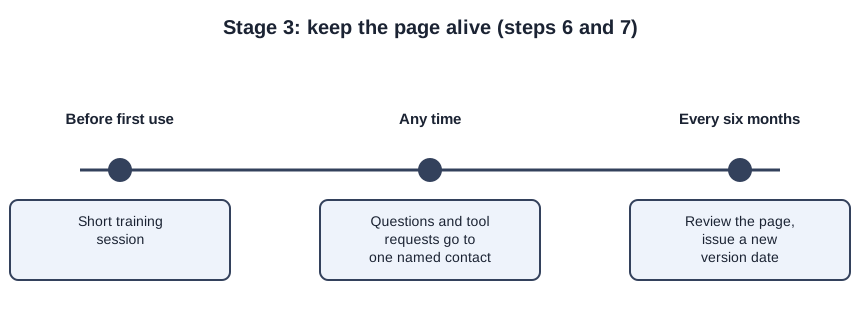
- Name one contact and state the consequence. ASAE’s governance note says an internal AI Strategy Group reviews tool requests and exceptions and answers questions, and the same NIST framework asks for roles and lines of communication to be documented and clear. For consequences, Link observes that stricter policies spell out what happens after a violation.
- Add training, a version date, and a review date. ASAE’s policy expects staff to finish foundational training before using AI, and NIST’s framework also calls for AI risk training consistent with policy and for deciding how often periodic review happens. ASAE reviews its own policy “at minimum twice per year,” a sensible pace for what Independent Sector calls “a dynamic and evolving field.”
Stage 4: test it before it goes out
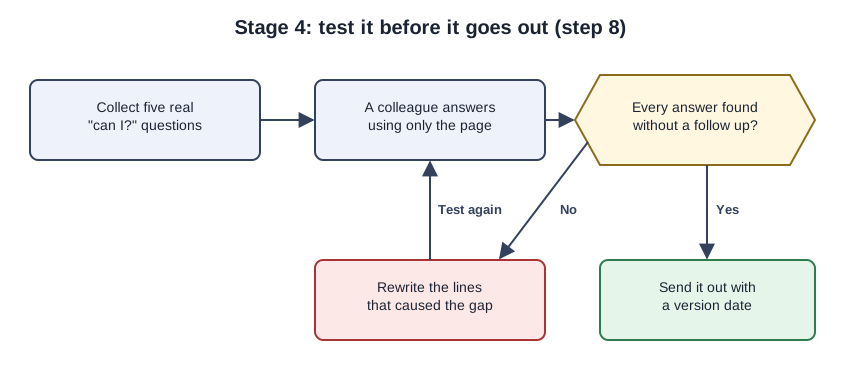
- Test the draft with real questions, then publish it. Collect five “can I?” questions staff have actually asked, give the page to a colleague who did not write it, and rewrite any line that left them guessing. If the board wants to see the page, it can travel with the one-page board brief.
The page, filled in for a made-up trade association
The association below is invented, so treat this as a teaching example rather than a case study.
MIDSTATE FLOORING ASSOCIATION: STAFF AI USE
Version 1.0, approved by the executive director on October 1, 2026.
Next review: April 1, 2027.

WHO THIS COVERS: all staff, and anyone doing association work for us.

TOOLS: Use the tools on the approved list in the shared AI folder,
signed in with your association account. Want to try another tool?
Send its name and your purpose to the AI contact before using it.

NEVER PUT IN: member records, employee or HR files, financial data,
legal matters, executive committee transcripts, or copyrighted work
we lack permission to use. Member data? Use the member-data checklist.

OFF LIMITS: anything illegal, posing as a real person, stating a
position the board has not taken, or letting AI make the final call
on a member, a hire, or a colleague.

CHECKING AND LABELING: A person fact-checks every AI draft before it
is sent, posted, or used to decide something. Member-facing work with
meaningful AI drafting carries a short note. Internal drafts do not.

TRAINING: Finish the AI basics session before your first use.

QUESTIONS AND EXCEPTIONS: Ask the operations director. Exceptions
are granted in writing.

IF THIS PAGE IS NOT FOLLOWED: handled like any other handbook breach.
Check the page against five real questions
Run the step 8 test once more on the final version. Then confirm that the page names specific data categories, covers copyright, fact-checking, and data security, says whether internal drafts need a label, names one contact, and shows a version date and a next review date. If any of that is missing, or the page spills onto a second sheet, fix it before it goes out.
Mistakes that make staff ignore the page
The most common shortcut is borrowing someone else’s policy. FSAE’s report calls the sample policies it shares “simply examples” and says each association should develop its own and seek legal advice. ASAE’s policy (version 1.2, August 11, 2026) is worth reading, but it was written for ASAE’s staff, not as a template for yours. Putting tool names inside the policy text is another trap, in our view, because every new tool then forces a rewrite. We expect a rule that everything touched by AI must be disclosed to get quietly ignored, and a flat ban with no approved alternative to push work onto personal accounts. And a page without a named contact leaves staff guessing, which we think is how quiet, unapproved use starts.
Sources
- ASAE: Organizational AI Policy
- Associations Now Plus: Developing Policies To Govern AI (Ann Link, CAE)
- NIST AI 600-1: Generative Artificial Intelligence Profile
- NIST AI 100-1: Artificial Intelligence Risk Management Framework (AI RMF 1.0)
- Independent Sector: Five Steps to Unlock AI’s Potential for Nonprofits
- FSAE / Association Societies Alliance: AI Usage in Associations Report