Tutorial
BeginnerAsk Your Graph Questions With a Local AI Model
Point a small AI model running in your browser at your association's graph, make it show the path it walked, and check its work. Nothing leaves your machine.
Time needed: About 20 minutes, plus a one-time model download
Before you start:
- A desktop or laptop with a modern browser
- About 1.5 GB of free disk space for the model (downloaded once, on your click)
Local AI Webllm Knowledge Graph Association staff
By the end of this tutorial you will be able to point a small AI model in your browser at your association’s graph, ask it a question in plain words, and make it show the path it walked to the answer. Every answer gets checked against the real connections, and nothing leaves your machine.
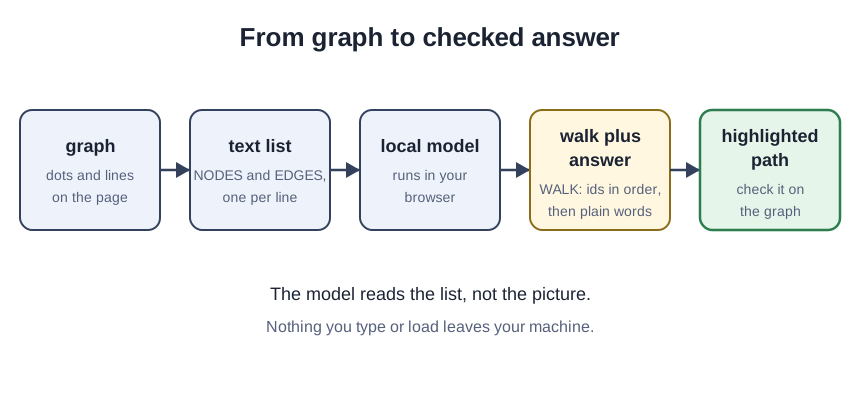
The honest part first: the model never sees the picture. It reads a text list of your graph, the named things and the named connections, one per line. You ask it to answer in two parts: first a WALK section, one line listing the node ids it used in order, then the answer in plain words. The lab lights up that claimed path on the real graph, so you can check the model’s story against the actual connections. This is an old reliable move: researchers who paired language models with passages to draw on got more specific, diverse, and factual answers than models answering from memory, and the passages doubled as provenance to inspect (Lewis et al.).
Small models still wander: inventing a node that is not in the list, or claiming a connection the graph does not have. Researchers call fluent-but-unfaithful text hallucination: words that drift from the source they were given (Ji et al.). A wandering walk is not a disaster. It is the exact thing this tutorial teaches you to catch at a glance, before anyone acts on the answer. The sample graphs in the lab are fictional. This is a teaching example, not a case study.
Try it now: the graph walk lab runs the whole tutorial in your browser. The model downloads once, on your click (about 1.5 GB), and its prompt template is the starter kit, free with your email.
Load the model and read its world
-
Download the model on your click. Open the lab and start the default model. The page checks for WebGPU first and says plainly if your browser cannot run models locally. The download is about 1.5 GB, once; afterward your browser keeps a saved copy, and your questions never leave the page.
-
Read the text list the model will see. The lab shows the graph as the model reads it: a NODES section, one line per thing, and an EDGES section, one line per connection. This list is the model’s entire world, which is exactly what makes its answers checkable.
Ask, then check the walk
-
Ask who chairs the Safety Committee, and read the WALK section first. Tap the sample question. A good reply comes back in two parts: a line reading
WALK: james -> safety, then “James Park chairs the Safety Committee.” Read the walk first: the walk is the claim, the answer is the claim in nicer clothes. -
Check the highlighted path on the real graph. The lab lights up the claimed path. Click the Safety Committee dot: the panel shows James Park chairs the Safety Committee. The ids match, the connection exists, the direction is right. We ran every sample question against the data the same way before publishing.
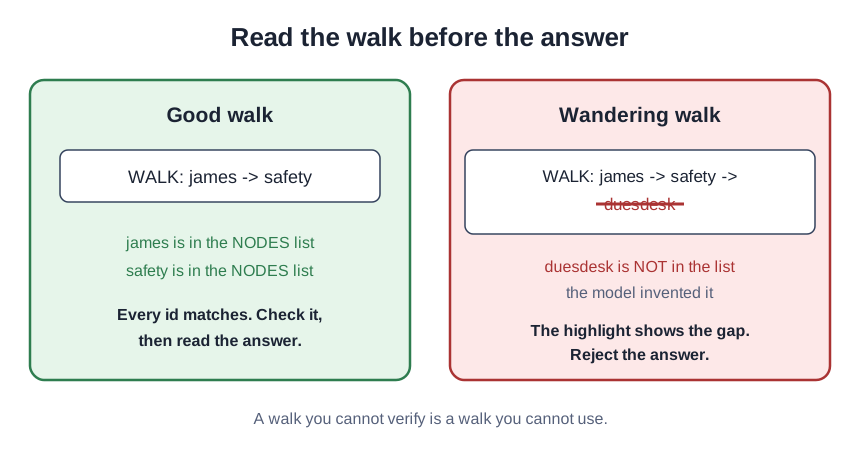
- Ask something the graph cannot answer. Try “Which committee handles dues renewals?” Nothing in the sample mentions dues renewals. An honest model says it is not in the list. A wandering one invents a walk, and the lab shows the failure in the open: a path that skips connections, or ids that match nothing. Then switch to the relationship dataset and try the longer sample question, tracing Tom Becker to the Highway Funding Bill.
Check your result
Ask the Safety Committee question again: the WALK section lists only ids from the NODES list, and every hop between consecutive ids has a real edge. Any invented id or missing hop rejects the answer, with no partial credit. Ask the dues renewals question and confirm it fails visibly. Ask a vague question and notice the walk is vague too. Specificity in, checkability out.
Where confident answers go wrong
Trusting the answer without checking the path is the first: the answer is decoration, the walk is the substance. Asking about things the graph does not name is the second: the model’s world is the text list, and it would rather invent than admit silence. Accepting a vague walk from a vague question is the third: a walk you cannot verify is a walk you cannot use.
Where this leads
The lab covers one small sample graph. The larger idea, modeling members, chapters, committees, and behavior as graphs you can walk and question, is the subject of the Association Ontology book, whose concept chapter is already on the site: Association Ontology.
Sources
- Lewis et al.: Retrieval-Augmented Generation for Knowledge-Intensive NLP Tasks (NeurIPS 2020)
- Ji et al.: Survey of Hallucination in Natural Language Generation (ACM Computing Surveys, 2023)