Article
BeginnerWhich AI Is Which: A Plain-English Map of the Models
ChatGPT, Claude, Gemini, Grok, Muse, and the free open models side by side: what each one is, what it costs, what it is best for, and which to reach for first.
AI Models Beginner Guide Subscriptions Open Models
By the end of this piece, you will be able to name the major AI tools, say what each one is for, and pick the right one for the task in front of you. No background needed.
If you do not live inside the AI world, the names blur together: ChatGPT, Claude, Gemini, Grok, Muse, plus a second set of names like Qwen and Llama that show up in articles like this one. They are not interchangeable. But the differences are simpler than the marketing makes them look.
The one split that explains everything
There are really three kinds of things people call “AI”:
- Subscription chatbots. You pay about twenty dollars a month, or use a free tier, and talk to a very capable model in a browser or app. ChatGPT, Claude, Gemini, and Grok all live here.
- Agents that do things. Newer. You give them a goal and they carry out the steps themselves: booking, buying, filling in forms. Muse, from Meta, is the big new one.
- Open models you run yourself. Free, downloaded to your machine, and nothing you type ever leaves the building. The Qwen family, Meta’s Llama, Google’s Gemma, and others. We built a working demo of this on our own site: the local model lab runs one entirely in your browser.
Every tool below is one of those three. Once you see the split, the rest is details.
The five paid assistants, side by side
Prices change, so treat these as the shape of the market, not a quote: the standard paid tier for a chatbot is about twenty dollars a month, and every one of them has a free tier worth trying first. Check the vendor’s current page before you buy.
| Tool | Maker | What it is | Costs | Best for | Watch out for |
|---|---|---|---|---|---|
| ChatGPT | OpenAI | The best-known chatbot | About $20/mo (Plus); free tier exists | All-round writing, images, voice, research | Your prompts go to OpenAI’s servers; the free tier now shows ads |
| Claude | Anthropic | The careful writer | About $20/mo (Pro); free tier exists | Long documents, careful drafting, editing | Same cloud tradeoff: read the data terms before member information goes in the prompt box |
| Gemini | The one inside Google’s apps | About $20/mo (AI Pro); free tier exists | Work you already do in Gmail, Docs, and Drive | Most useful if your team lives in Google Workspace; new models roll out in stages | |
| Grok | xAI | The one tied to X | Paid plans from about $10/mo; also bundled with X Premium | Following fast-moving conversation on X | Two confusing storefronts (X versus grok.com); xAI does not say exactly which model each tier gets |
| Muse | Meta | A personal agent, not a chatbot | Free tier plus paid plans | Multi-step errands: booking, shopping, forms | Brand new (September 2026) and US-only; agents make mistakes, so review anything involving money |
The free models you run yourself
These cost nothing and keep your words on your machine. The tradeoff is capability: they are good writing helpers and weaker analysts.
| Model family | Who makes it | Runs where | Best for | Watch out for |
|---|---|---|---|---|
| Small open models (Qwen3, SmolLM2, Phi-4-mini) | Alibaba, Hugging Face, Microsoft | Your laptop, in a browser or a free app | Drafts, rewrites, and short summaries, privately | Weaker on hard reasoning; the larger ones want a decent laptop with plenty of memory |
| Qwen3.8-27B | Alibaba | A workstation with a graphics card | The strongest model you can plausibly run yourself | Not a laptop model; setup takes some comfort with computers |
| Llama, Gemma | Meta, Google | Your own machines or cloud | Teams that want open weights from the big labs | Gated: you must accept the license before downloading |
| Kimi K3 | Moonshot AI (independent lab) | Datacenters, through an API or cloud | Organizations with cloud budgets that want open weights at frontier quality | Enormous. This is not a download-and-run model |
| DeepSeek, Mistral | Independent labs | Their apps and APIs, or your own machines | Low-cost options from labs outside the big five | Newer names; read their data terms the same way you would for any vendor |
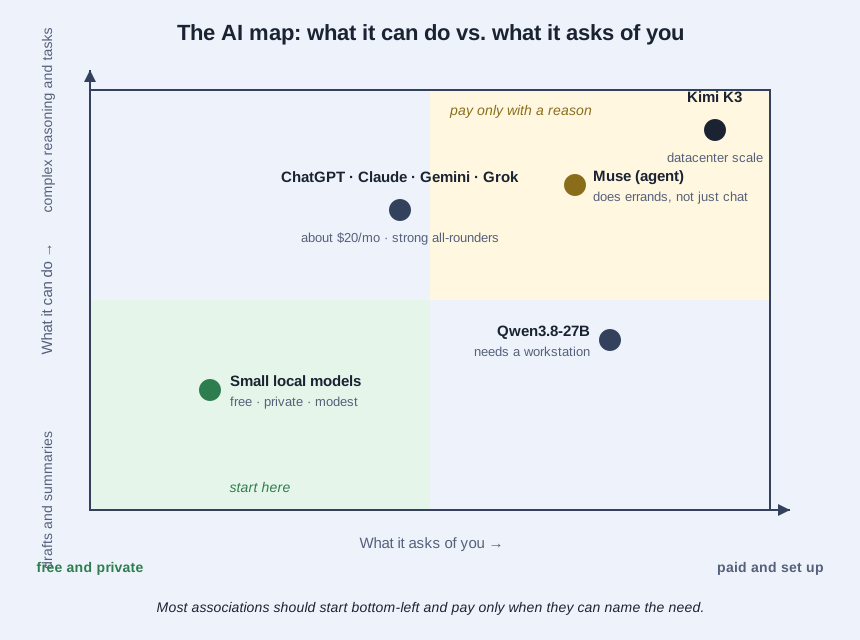
Which one for which job
- Drafting a member email or a session description: any of the five paid chatbots. If it contains member data, use a local model instead.
- Summarizing a long committee report: Claude or ChatGPT, which handle long documents best.
- Turning a spreadsheet into a first-draft board summary: ChatGPT or Gemini, especially if the sheet lives in Google Drive.
- Seeing what people are saying about your issue right now: Grok, or any chatbot with web search turned on.
- Booking travel, comparing vendors, filling in the same form twice: Muse, the agent. Read every confirmation screen before it acts.
- Anything with member names, emails, or dues data: the free local route. Our local model lab shows what this looks like running entirely in your browser.
The question underneath
A lot of people quietly worry these tools are here to replace them. We hear it from students and staff alike, and it is a fair worry to say out loud. Here is the honest version: these tools do first drafts and busywork at speed. They do not know your members, they cannot sit in the meeting, and they have no judgment about what your association should do. The person who can tell a good draft from a bad one becomes more valuable with these tools, not less.
Where to start
Start free. Use a free tier or a local model for a week on real work, and pay the twenty dollars only when you can name the person and the job that needs it. That is the same rule as our three-routes piece: nearly everyone on the free routes, a few paid seats you can name individually. The map above tells you which is which. The judgment about what to buy is still yours.