Tutorial
IntermediateWardrive Your Venue Before Doors Open
Walk your event venue with a phone app, map every wireless network in the building, and catch the evil twin before your attendees do. Passive, legal, and free.
Time needed: About 30 minutes
Before you start:
- An Android phone with GPS for the walk itself
- Venue access the day before the event
Wardriving Event Security Wifi Events
By the end of this tutorial you will be able to walk your event venue with a phone in your pocket, produce a map of every wireless network in the building, and spot the one that is pretending to be yours. You will also know exactly where the legal line sits, because this technique is powerful only while it stays on the right side of it.
Try it now: the venue wardrive lab analyzes a wardrive log in your browser: coverage map, encryption breakdown, channel crowding, and evil-twin flags against your official network name. The example is a synthetic walk of a fictional convention center with a planted rogue. Your own CSV never leaves the tab.
The problem: someone else’s network wearing your name
On August 10, 2026, passengers on Delta Flight 591 from Las Vegas to Atlanta noticed a WiFi network called “Delta WiFi Fast.” It was not Delta’s. Someone on board was broadcasting a look-alike network, and the crew shut down the plane’s real WiFi for about thirty minutes as a precaution while federal investigators got involved. The technique has a name: the evil twin, a rogue access point impersonating a trusted network so devices connect to the attacker instead. Tech Digest covered the incident.
Conferences are the natural habitat for this. At RSA Conference 2016, security researchers ran the experiment in reverse: they set up their own rogue access point on the show floor just to see what would happen. Thousands of devices tried to connect to it. The researchers were the good guys; the point was that standing up the trap took minutes and the victims lined up on their own. Help Net Security wrote up what they found.
Your annual meeting has the same shape: a few thousand attendees, most of them non-technical, all of them tapping the familiar-looking network name in a hurry. The fix is to see your venue’s wireless landscape before they do. That is what wardriving is.
What wardriving is, and what it is not
Wardriving is driving or walking around while a device passively logs the beacon frames that WiFi access points broadcast: network name, hardware address, signal strength, encryption type, and the GPS position where each was heard. The name is old (a play on wardialing from the 1980s phone-hacker scene), but the practice is just systematic listening.
What it does: it maps the wireless networks in an area, shows you which are open or weakly encrypted, and reveals anything impersonating a network you care about. What it does not do: connect to anything, read anyone’s traffic, or identify any person. A wardrive log holds beacons. It cannot tell you who joined a network or what they did there, and this tutorial never asks it to.
The one tool you need
The wardriving community runs a crowdsourced map of wireless networks called WiGLE, and its Android app is the standard way to log a walk: start it, put the phone in your pocket, and walk. It records every beacon it hears with GPS coordinates, and it exports the standard CSV this tutorial’s lab reads. (We name it here because it is the community project behind the file format, not a product recommendation.) Laptop users with more patience can run Kismet, the open-source wireless detector, but for a pre-event walk the phone app is the whole kit.
Cost: zero. Hardware: the phone your events person already carries.
The walk, in six steps
- Get the venue’s blessing. Tell the venue what you are doing: “we are passively logging wireless network names and signal strengths to check coverage; we will not connect to anything.” Get the venue IT contact’s name and number before you start. If the venue says no scanning, there is no walk.
- Set up the phone. Charge past 80 percent, install the wardriving app, turn GPS to high accuracy, turn WiFi on for scanning. Write down your official network names exactly as broadcast, case and all.
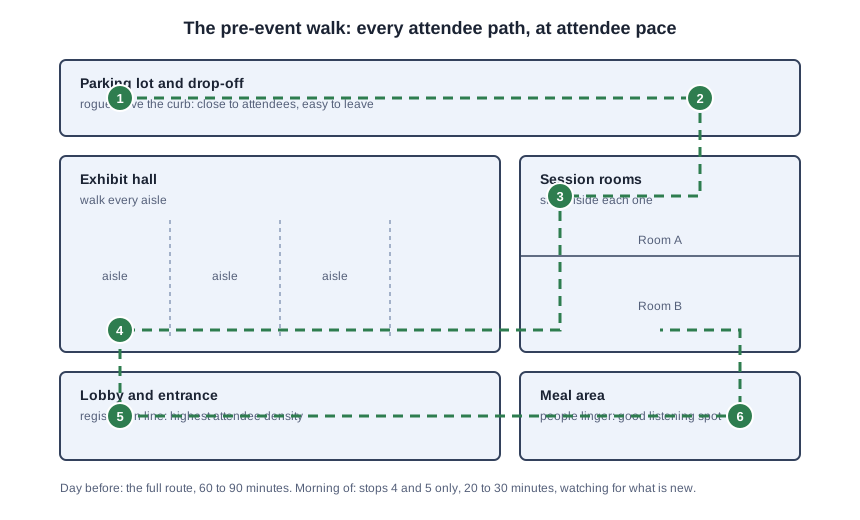
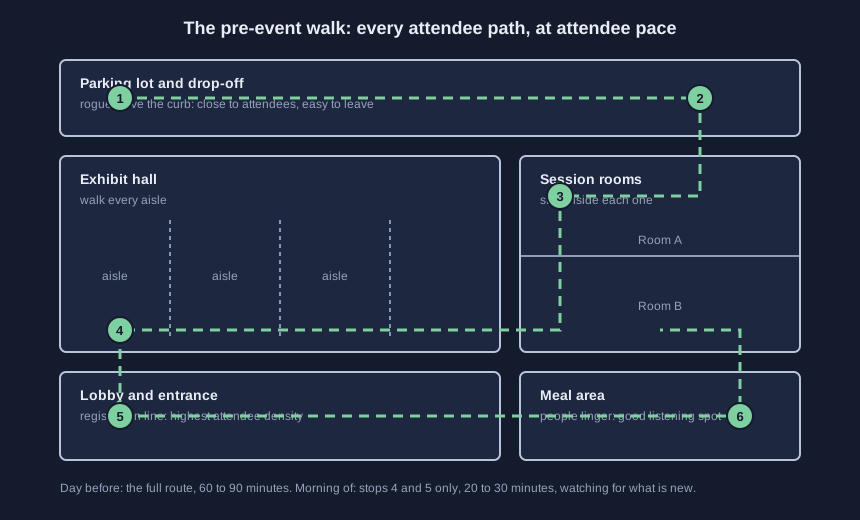
- Walk the day-before route (60 to 90 minutes). Every path an attendee will walk, at attendee pace: entrance and registration, lobby, every exhibit aisle, inside each session room, meal areas, parking lot and drop-off. Phone in a pocket, screen off is fine. You are building the baseline.
- Walk the morning-of route (20 to 30 minutes). High-traffic legs only: entrance, lobby, exhibit floor. One question: what changed overnight? Anything new since yesterday gets a second look.
- Export and analyze. Export the CSV from the app, drop it into the lab, type your official network name exactly, and read every finding.
- Escalate and file. Anything impersonating your network goes to the venue IT contact and your event lead before doors open. File the walk report from the starter kit with your event records.
Two rules hold for the whole walk: never join a network you find, not even an open one, not even to test it; and the walk is ears only, mapping networks, never people.
Check the results: what the lab tells you
Four readings, in the order that matters:
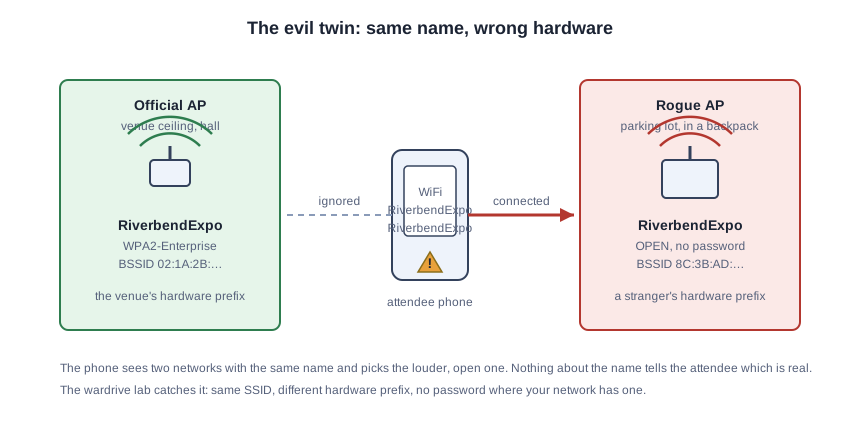
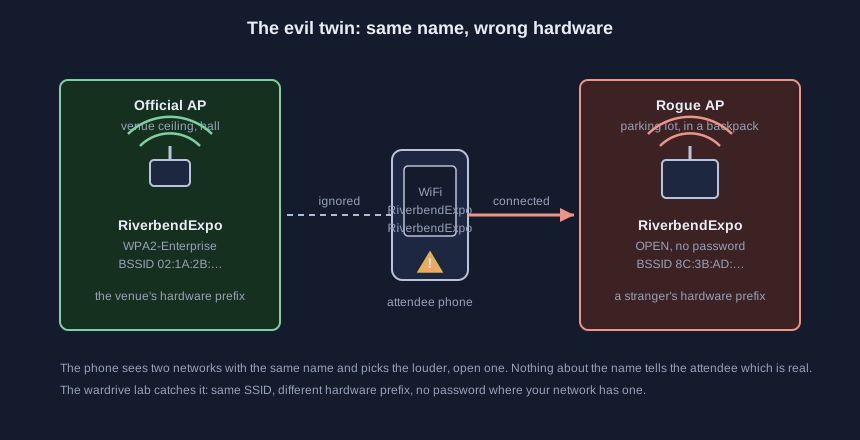
Evil twins. The lab groups every access point broadcasting your name by hardware vendor prefix. Your access points share one; a twin almost never does. Same name, different hardware, strong signal near your attendees: that is the finding that ruins someone’s morning, which is the point of finding it before doors open.
Look-alikes. Names within a couple of edits of yours, or yours with “_Free” or a year bolted on. Attendees in a hurry tap the familiar-looking one.
Encryption breakdown. Open networks and WEP relics in range. Most are neighbors, not threats, but a WEP network with your organization’s name on it is a retirement candidate, and an open network wearing your name is an escalation.
Coverage. The map shows where your official network was heard and how strong it was. Dead zones in session rooms are an attendee-experience problem you can fix with the venue before anyone complains.
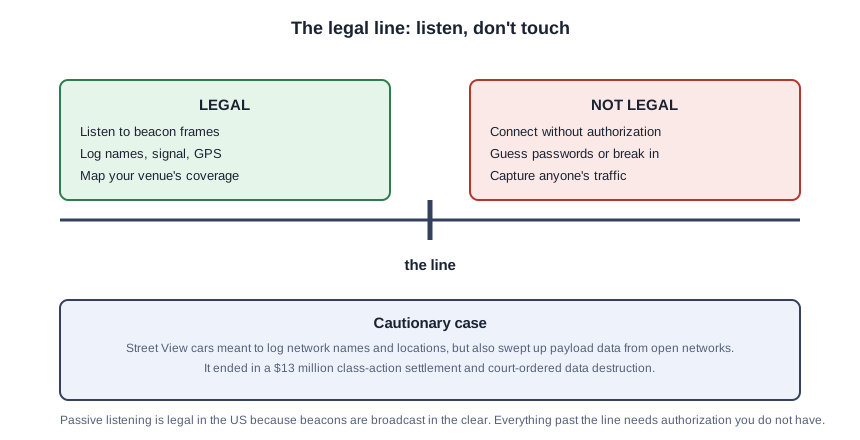
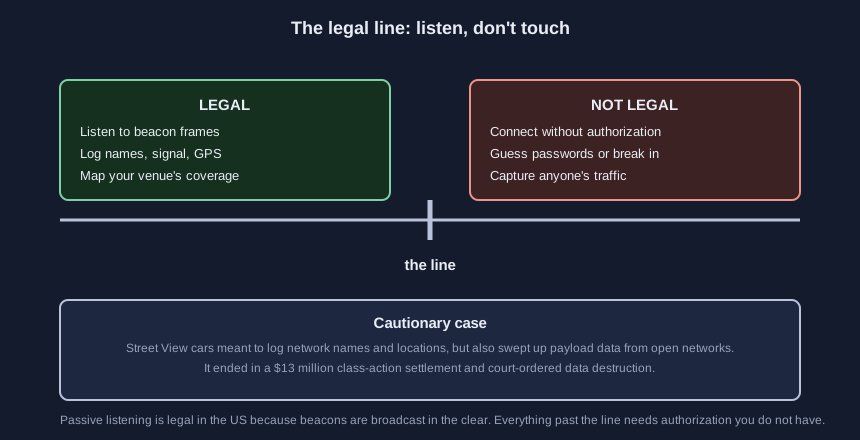
The legal line, stated plainly
Passive wardriving, listening to beacons that access points broadcast to everyone in range, is legal in the United States. No federal law prohibits receiving radio signals that are deliberately transmitted in the clear. The line is crossed the moment you go from listening to interacting:
- Connecting to a network without authorization can violate the Computer Fraud and Abuse Act (18 U.S.C. 1030), even if the network is open. “It let me in” is not authorization.
- Guessing passwords or otherwise breaking into a network is the same statute, more clearly.
- Capturing traffic content, emails, passwords, anything people send, can violate the Wiretap Act. The cautionary case is Google’s Street View program: cars meant to log network names and locations also swept up payload data from open networks, and it ended in a $13 million class-action settlement plus a court-ordered data destruction. Listening to beacons is one thing; keeping the contents of strangers’ communications is another.
Three more boundaries. Venue policy beats everything here: if the venue says no scanning, there is no walk. Other countries have other rules; this tutorial describes US law, and your attorney describes the rest. And people are off limits: do not follow a signal to someone’s laptop to identify them, do not log who connects to what. The walk maps networks, not humans.
The Riverbend walk, specified
This is a teaching example, not a case study. The fictional Riverbend Trade Association runs its annual meeting at the fictional Riverbend Convention Center. Their events coordinator walks the venue the day before with the wardriving app running:
- 8:00 AM: entrance and registration, lobby, both exhibit aisles. 14 access points on the official “RiverbendExpo” network, all sharing the venue’s hardware prefix.
- 8:20 AM: session rooms and meal areas. Two WEP networks still broadcasting, one a legacy staff network, one an old printer. Noted for retirement.
- 8:25 AM: parking lot. One access point broadcasting “RiverbendExpo” from unfamiliar hardware, no password, strong signal. One “RiverbendExpo_Free” in the lobby, open.
- 8:30 AM: CSV exported, uploaded to the lab. The evil twin and both look-alikes flagged. Venue IT confirms neither is theirs; both are gone before the first attendee arrives. The walk report goes in the event file.
Total cost: one staff member’s morning. Total hardware: one phone.
Five mistakes that waste the walk
Walking too fast. Beacons broadcast about ten times a second, but GPS needs dwell time; attendee pace, not security-guard pace. Forgetting GPS: a log without positions is a list, not a map. Joining a network “just to check”: that is the legal line, and you just crossed it. Skipping the morning-of walk: the twin that matters was set up at 6 AM. Filing nothing: without the walk report, next year’s team starts from zero and the paper trail does not exist.
Take the starter kit
The starter kit holds the pre-event walk field checklist (print it, clip it to a clipboard), the synthetic Riverbend walk CSV from this lab’s example, the rogue-AP identification one-pager, and the fill-in walk report template. Free with your email through the form on the demo page.
Sources (5)
- Tech Digest: Delta flight declares emergency after rogue Wi-Fi network appears onboard
- Help Net Security: A rogue access point at RSA Conference? Here's what happened
- FindLaw: In re Google Street View Electronic Communications Litigation (9th Cir.)
- Congressional Research Service: Cybercrime: An Overview of 18 U.S.C. 1030
- WiGLE: Wireless Geographic Logging Engine