Tutorial
AdvancedWalk In With Your Face: Facial-Authentication Entry for Association Events
Set up face-verified express entry for your event: opt-in selfie enrollment, a gate camera that admits members without a ticket scan, and consent done right.
Time needed: About 30 minutes
Before you start:
- A webcam and Chrome or Edge for the live demo
- Someone technical to build the gate software (the strategy sections work without them)
- A registration flow where you can add an opt-in checkbox
Facial Authentication Events Entry Privacy
By the end of this tutorial you will be able to run a face-verified express entry lane at your event: members enroll a selfie when they register, then walk through a gate camera that admits them with no ticket scan. Consent, not the model, is the hard part. Every face in the system put itself there on purpose.
Two ways to use this. Read the strategy sections and hand the kit spec to IT, or do the full build: enrollment flow, gate software, deletion routine.
Try it now: the face-gate lab runs the real thing in your browser. Enroll your face, then walk up to the gate and watch it admit you and deny a stranger. No image leaves the page.
Seven moves, in order:
- Borrow the stadium playbook.
- Unlearn “train a neural network.”
- Enroll members through registration.
- Build the gate lane.
- Calibrate with volunteers.
- Run event day with a fallback lane.
- Delete the templates.
Step 1: borrow the stadium playbook
The University of Florida is the first college in the nation to offer stadium entry through facial authentication. Its Express Entry program launched for the 2025 football season: fans link their ticket account and snap a selfie, enrollment is free and takes less than a minute, and on game day they walk through dedicated lanes at Gates 1, 4, 7, 8, 12, and 16 with no phone and no ticket. Voluntary and opt-in for fans 18 and older, the university itself does not create, store, process, or transmit biometric data. Ohio State became the second university to run it at scale for 2026.
That is the experience you are replicating. No lane scans everyone; the camera only compares against people who opted in.
Step 2: unlearn “train a neural network”
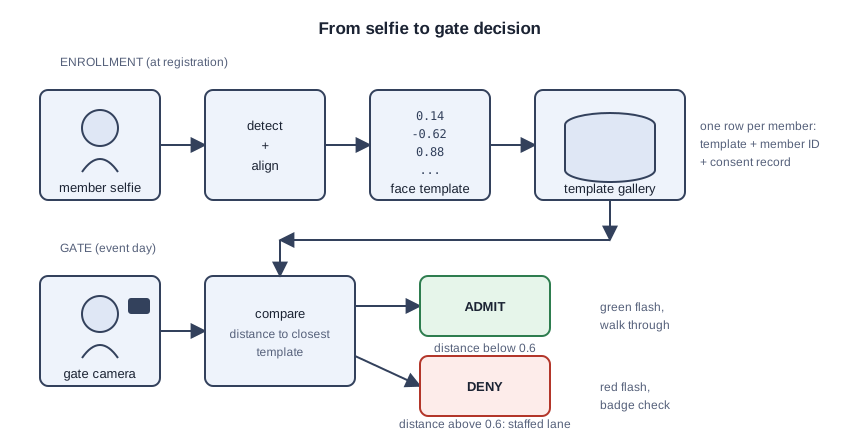
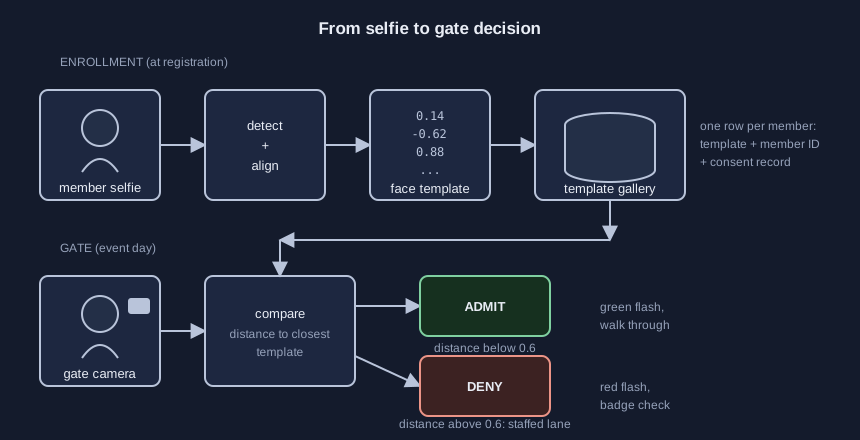
You do not train a neural network on your members’ photos. A pre-trained face-embedding model converts a face into a numeric template, a list of numbers capturing what makes it distinct. Enrollment means running each selfie through that model once and storing the template. That is the only “training,” and it is not model training. The pre-trained model has seen millions of faces; your few thousand photos would produce a worse one. Your pipeline: detect, align, convert to a template, compare against the gallery.
Two matching modes matter. In 1:1 verification, the member shows a badge first and the gate compares against that one template. In 1:N identification, the gate searches the whole event gallery. Stadium lanes are 1:N against opted-in fans.
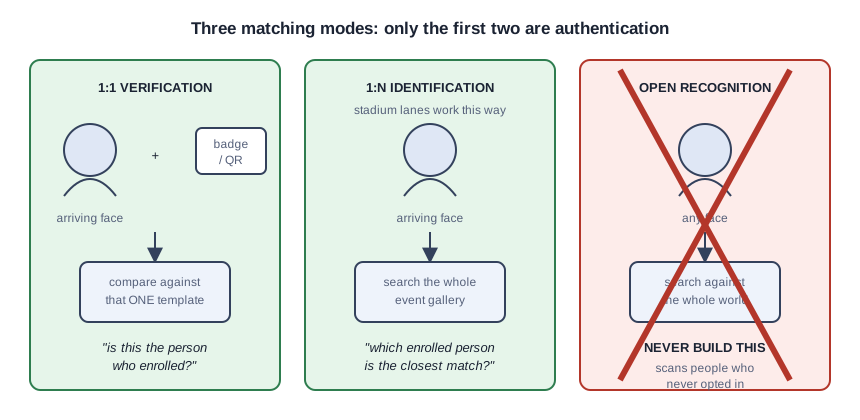
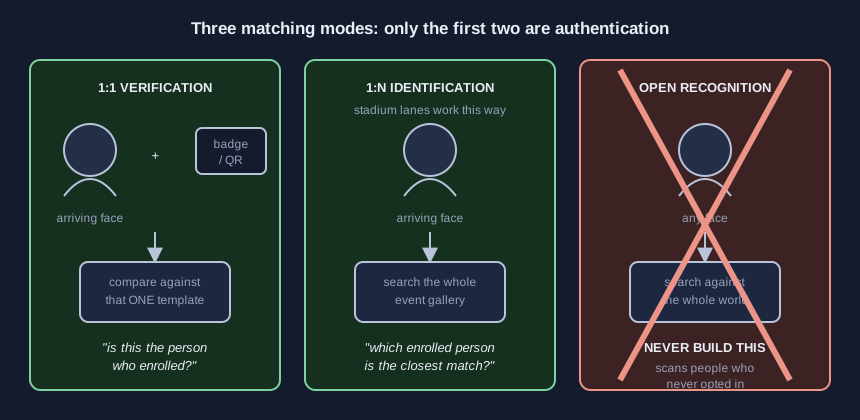
Facial authentication is not facial recognition. Authentication asks “is this the person who enrolled,” comparing only against photos your members submitted. Recognition asks “who is this person,” scanning crowds against outside databases. Your gate does the first; say that sentence to your board, because it is the entire trust argument.
Step 3: enroll members through registration
Enrollment rides on registration. Add one opt-in checkbox stating what is collected (a face template, not a photo), what it is for (express entry at this event), how long it is kept (deleted after the event), and a written release. In Illinois, the Biometric Information Privacy Act requires a written release before collection, plus a public retention schedule. This is not legal advice; have your lawyer read the text before it goes live.
Give members selfie guidelines or you will enroll garbage: face the camera, even light, no sunglasses, no hat brim, plain background. One face per member, linked to their registration record, with the consent record stored alongside for one-query deletion later.

Step 4: build the gate lane
One express lane per gate keeps the pilot small: a camera at eye height (about 1.6 meters) angled slightly down, even front lighting on faces, and a laptop running the matching software against your template gallery. Put the express lane beside the traditional lane, never instead of it.
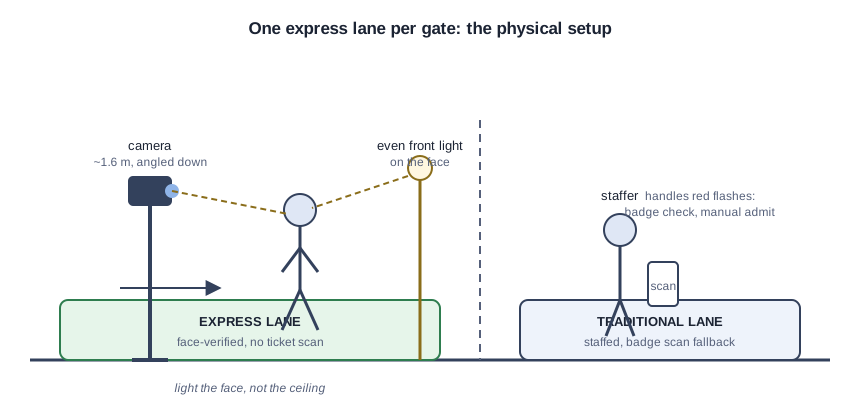
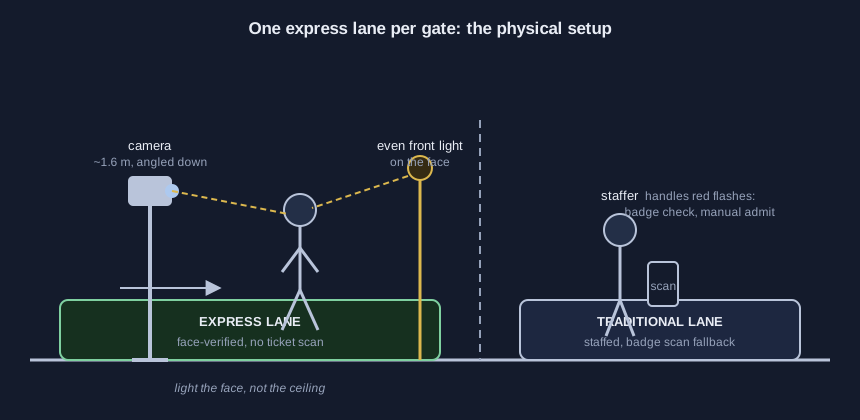
Lighting matters more than model choice. A backlit doorway creates the failures, not the algorithm: templates match worse when the enrollment selfie was taken in daylight and the gate photo is a silhouette. Light the face, not the ceiling.
The gate laptop needs nothing exotic: a mid-range machine runs the detector and the embedding model in real time for one lane. Keep it offline or on a closed network; the templates never need to leave the room. If the venue Wi-Fi is untrusted, a phone hotspot or a travel router gives the laptop its own local network without touching venue infrastructure.
The scenario below is made up to teach the decision logic; no real association ran it. The gate computes a distance between the arrival’s template and the closest enrolled template; smaller is a better match. The demo admits below 0.6: 0.38 means admit and flash green; 0.58 is borderline, so check the badge; 0.74 means deny and send the person to the staffed lane. Your volunteers set the real threshold in step 5.
Step 5: calibrate with volunteers
A gate tuned on your staff will fail your members. Recruit 20 or more volunteers across ages and appearances, because NIST tested nearly 200 face recognition algorithms and found empirical evidence of demographic differentials in the majority of them: match accuracy varies across groups. A gate that admits some members smoothly and stops others repeatedly is a discrimination problem wearing a technology costume.
Calibrate the day before: time 50 walk-throughs, test glasses on and off, hats, and masks pulled down, then tune the threshold. A lower bar admits fewer strangers but rejects more members, and every false reject is a person standing in your express lane feeling accused. Pick the point where false rejects stay rare and staff can absorb the exceptions.
Step 6: run event day with a fallback lane
The express lane is optional and the traditional lane stays open; some members will never opt in. Post a sign at the lane: “This lane verifies your face against the selfie you submitted at registration. No image leaves this device.” One staffer per lane handles red flashes: badge check, manual admit, no argument.
Monetization lives here too. Name express entry as a benefit: early-access lanes for VIP tiers, a sponsor-branded express lane, shorter gate staffing overall. Speed is the value proposition; consent is the price of admission. Price the sponsor lane like any other event sponsorship: logo on the lane signage, a mention in the attendee email, and a post-event report with throughput numbers. Sponsors buy speed stories; a lane that moved hundreds of people with no ticket fumble is a story.
Step 7: delete the templates
When the event ends, the templates die. Write the deletion into the same policy members signed: templates destroyed within a set number of days after the event. Illinois’ law requires destruction when the purpose is satisfied or within three years, whichever comes first. Run the deletion with a named owner and a confirmation log, the way you would reconcile the cash box. Never let the templates drift into a marketing database.
Check the gate before event day
Three checks. The stranger test: enroll yourself in the face-gate lab, then have someone else face the camera. The gate must deny them every time. The throughput test: if 50 walk-throughs do not beat badge scanning on speed, the lighting is wrong. The deletion audit: confirm test templates are actually gone, not just unlisted.
Five mistakes that break a face gate
Backlit selfies with sunglasses, then blaming the model. No staffed fallback, so the first false reject becomes a scene. Tuning the threshold on ten staffers who all look alike. Training a model from scratch instead of enrolling into a pre-trained one. Keeping templates “just in case” after the event.
Take the starter kit
The starter kit holds the consent and deletion policy template, the enrollment email copy, the gate setup checklist, the calibration worksheet, and pointers to the open-source embedding models the demo uses. Free with your email on the demo page.
Sources (4)
- Florida Gators: 'University of Florida Becomes First College to Launch Facial Authentication Express Entry for Fans' (Aug 12, 2025)
- Ohio State Buckeyes: 'New at the Shoe: Ohio State Unveils 2026 Home Game Themes and Fan Experience Upgrades' (Aug 14, 2026)
- NIST: 'NIST Study Evaluates Effects of Race, Age, Sex on Face Recognition Software' (Dec 19, 2019)
- Illinois General Assembly: Biometric Information Privacy Act (740 ILCS 14)