Article
BeginnerAI Captions and Image Descriptions: Walking One Webinar to the Point Where a Person Must Check
Speech recognition and image description tools produce drafts, and the research we read points to a person confirming them before posting. None of it studied an association.
Accessibility Captions Alt Text Research Webinars
A communications manager at a trade association has a recorded webinar and its slide deck ready to post, and the video platform has already produced captions and image descriptions on its own. The decision is whether they can go out as they are. None of the six sources we read studied an association, since they cover university lecture recordings, a small study with blind and low-vision participants, and technical diagrams, so this walk through one posting job borrows from them and marks where each one is thin.
The webinar below is a made-up example for teaching, not a report of anything an association did.
The captions arrive first
Start with the file the platform produced. An ACM Transactions on Accessible Computing article from Stuttgart Media University, a journal article we read as its arXiv copy, tested eleven services, ten commercial and one open-source, on recordings of university lectures and reports that accuracy ranged widely between services and between individual recordings. On the English datasets, the same article measured a word error rate of 10.9 percent for live transcription against 9.37 percent for transcription of a finished file, a difference the authors found significant. The authors’ conclusion in that article is that averages can mislead when the spread is this wide, which matters when speech recognition serves as an accessibility tool without a person supervising it.
The standard to hold the file to comes from the W3C Web Accessibility Initiative’s captions page, guidance from a standards body, which says captions generated automatically fall short of user needs and accessibility requirements until someone confirms they are fully accurate, and that they usually need significant editing. The same page adds that correcting an automatic caption file takes a good deal of time for people who do not do it regularly.
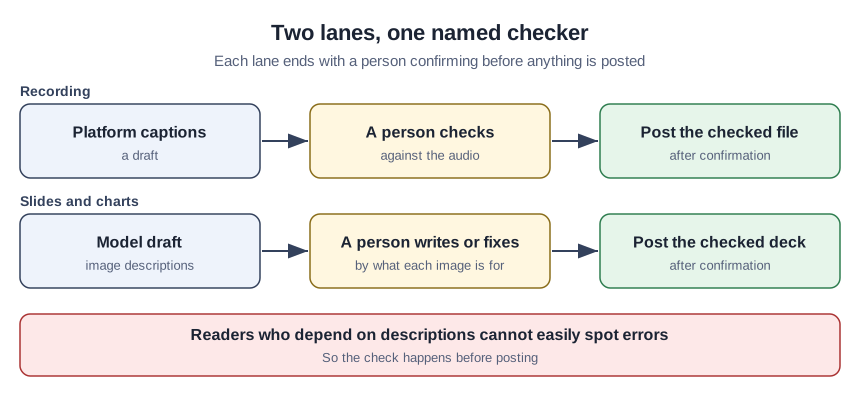
Decision point. Live captions during the session may be a convenience for the people attending, but the recording that stays on the member site should carry a file a person has read against the audio. We read it this way because the live results were the weaker ones and because the W3C bar is confirmed accuracy, not likely accuracy. A plain way to do the check is for one person to play the recording at normal speed while reading the file, stopping at every name, number and acronym, since those are the words members will notice first.
The slides are where fluent output misleads
Next come the slide images and charts. The W3C’s images tutorial, also standards body guidance, says every image needs a text alternative describing its information or function, and that the author has to decide what that text says from the image’s use, context and content. A model sees the pixels, not why a chart sits on slide 14, and the reason is the part the author supplies.
The abstract of a Web4All 2026 conference paper from the University of Pisa and Italy’s national research council reports a comparison of model-written and human-written descriptions of science, technology, engineering and mathematics images, and says that the model text often looked fluent and informative while substantial gaps remained, especially in structural details that accessibility depends on. The same abstract notes that good alternative text is often missing or inadequate for complex images such as diagrams and graphs, which is the kind of image an annual report or a dues-trend slide contains.
Decision point. Sort the deck by what each image is for before anyone asks a model for a description. A plain photo of the speaker may take a model’s draft and a quick correction, while a chart that carries the argument is better described by the person who knows the argument. The studies tested technical diagrams, not photos or association charts, so this split is our own suggestion and not their finding.
The person who most needs the description is the least able to catch its errors
The abstract of a conference paper presented at ASSETS 2025 by researchers at the University of Texas at Austin and the University of California, Berkeley, which we read as the arXiv copy, says that errors in model-written image descriptions are often hard to detect without sight. It also reports a user study with 15 blind or low-vision participants in which showing several variations of a description raised their ability to identify unreliable claims by a factor of 4.9 over a single description, and 14 of the 15 preferred seeing variations. That is a small study of one prototype method, so it says nothing about how your own tools behave.
What it does show is the position the posting job is in. A reader relying on a screen reader cannot be the one who notices that a description invented a detail, so the check has to happen before the page goes live and with the image in view.
Decision point. Name one person who checks each description against its image, and write that person’s name on the posting checklist. If nobody is named, the deck is posted unchecked by default. It is worth reading the sorting sheet in our article on when AI is the wrong tool at the same meeting, since a description is an answer that a reader relies on and cannot easily verify.
What the posting page owes its readers
A 2022 Department of Justice guidance page on web accessibility and the ADA, written by a federal agency for state and local governments and for businesses open to the public, says inaccessible web content means people with disabilities are denied equal access to information. That page also names the Web Content Accessibility Guidelines among existing technical standards that give helpful guidance, and says on its face that it does not reflect the requirements for state and local governments published in April 2024.
Nothing we read says whether a member-only association counts as a business open to the public, so we do not draw a legal conclusion here. The plainer reading is that a recording or deck members cannot use is a service that did not reach some of them, which is a reason to check whatever the legal answer is.
What the walk costs
We found no source that measured how long checking takes against captioning from scratch, so a claim that AI plus review is faster than the old way has no support in these six documents. What the W3C page does say is that correcting a file is slow work for people who rarely do it. The practical consequence is to schedule the check as part of the posting job, with a named person and a time slot, and to keep the draft only if the person finds it a better starting point than a blank file.
The tools in all of these studies were tested at one moment and have changed since, and none of the studies used association webinars, annual-report charts or newsletter photos. The direction is consistent across all six, though: draft by machine, confirm by person, and decide the confirming step before the file is posted.
Sources (6)
- Kuhn, Kersken, Reuter, Egger and Zimmermann: Measuring the Accuracy of Automatic Speech Recognition Solutions (ACM Transactions on Accessible Computing, vol. 16, issue 4, article 25, 2023; journal article, read as the arXiv copy)
- W3C Web Accessibility Initiative: Captions/Subtitles (Making Audio and Video Media Accessible; standards body guidance, updated 17 September 2024)
- Chen, Iyer and Pavel: Surfacing Variations to Calibrate Perceived Reliability of MLLM-generated Image Descriptions (ASSETS 2025; conference paper, read as the arXiv copy)
- Cardia, Angileri, Poggianti and Leporini: Human vs LLM-Generated Alt Text for STEM Image Accessibility: A Comparative Study (Web4All 2026, April 2026; conference paper)
- W3C Web Accessibility Initiative: Images Tutorial (Web Accessibility Tutorials; standards body guidance, updated 8 April 2026)
- U.S. Department of Justice: Guidance on Web Accessibility and the ADA (18 March 2022; government guidance)